Your Lovable, Bolt or Cursor prototype has real users. It also breaks every week, and you’re about to pay someone to sort it out. Before you do, you need to know whether to fix or rebuild your vibe-coded app, because the answer decides whether you’re buying a few days of work or a few months.
Most guides end with “book an audit”. This one gives you the audit’s first pass free: eight checks, about 30 minutes, no developer needed, ending in a verdict.
TL;DR
- Most vibe-coded apps need fixing, not rebuilding. The usual problems are exposed secrets, missing database access rules and fragile payment handling. Each of those can be fixed on its own.
- Your data model decides whether you rebuild. If your database can’t describe how your business works today, patching the screens won’t help.
- Run the 8 checks below on your own app. Score them, read off your verdict, and give the results to whoever you hire so you aren’t paying them to discover what you already know.
Why vibe-coded apps work in the demo and break with users
AI builders are good at getting a screen to show the right thing. Production needs more than that. Strangers have to be kept out of each other’s data. Payments have to keep working when someone closes the tab mid-checkout. A table with 50,000 rows has to load as fast as it did with five.
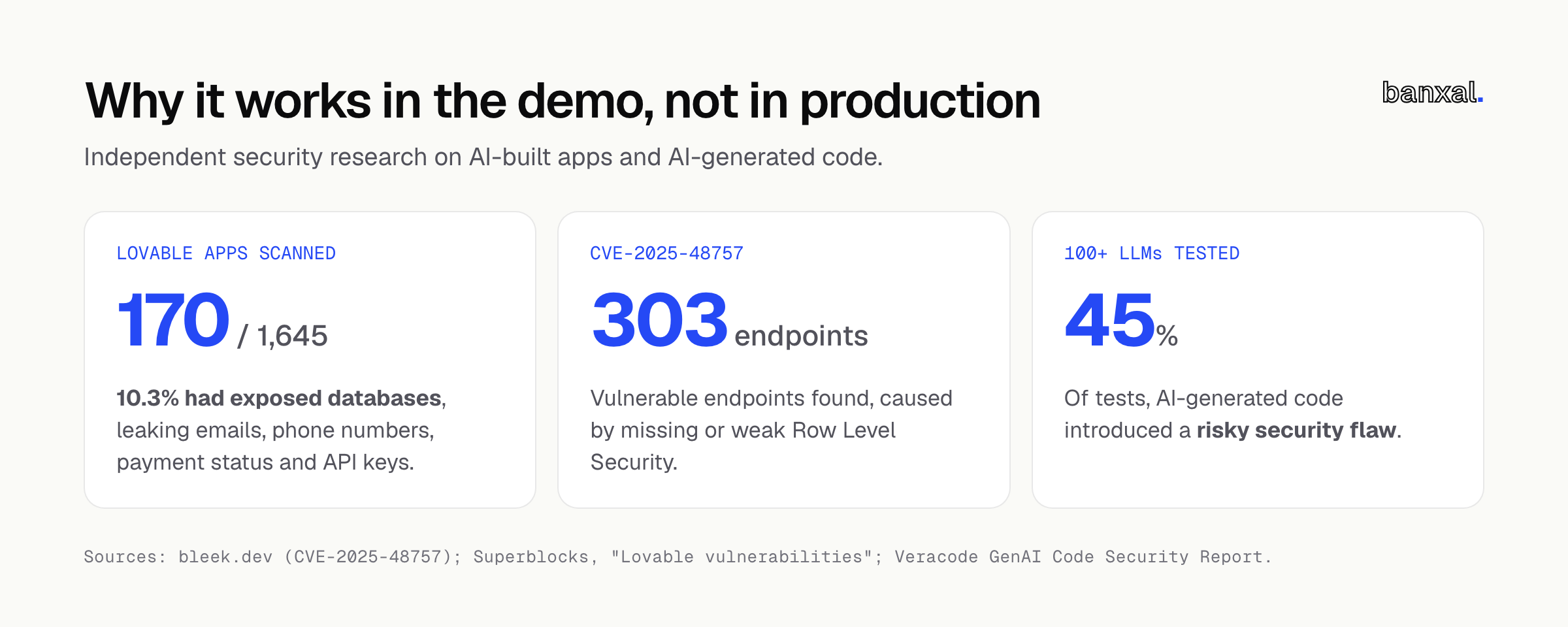
Security research shows how big the gap is. Veracode tested code from over 100 large language models and found that AI-generated code introduced risky security flaws in 45% of tests (Veracode GenAI Code Security Report). The best-known example is CVE-2025-48757. A researcher scanned 1,645 Lovable-built apps and found 170 (10.3%) with exposed databases across 303 vulnerable endpoints. The leaked data included emails, phone numbers, payment status and API keys (bleek.dev, Superblocks). The cause was missing or weak Row Level Security, which is check 2 below.
None of this means your app is doomed. The demo proved demand. The invisible parts just haven’t been built yet, and the checks below tell you how many of them are missing.
The 30-minute self-test: 8 checks
Run these only on an app you own or are authorised to test. Most checks just need your browser and your admin dashboards. Score each one Pass (0), Warn (1) or Fail (2).
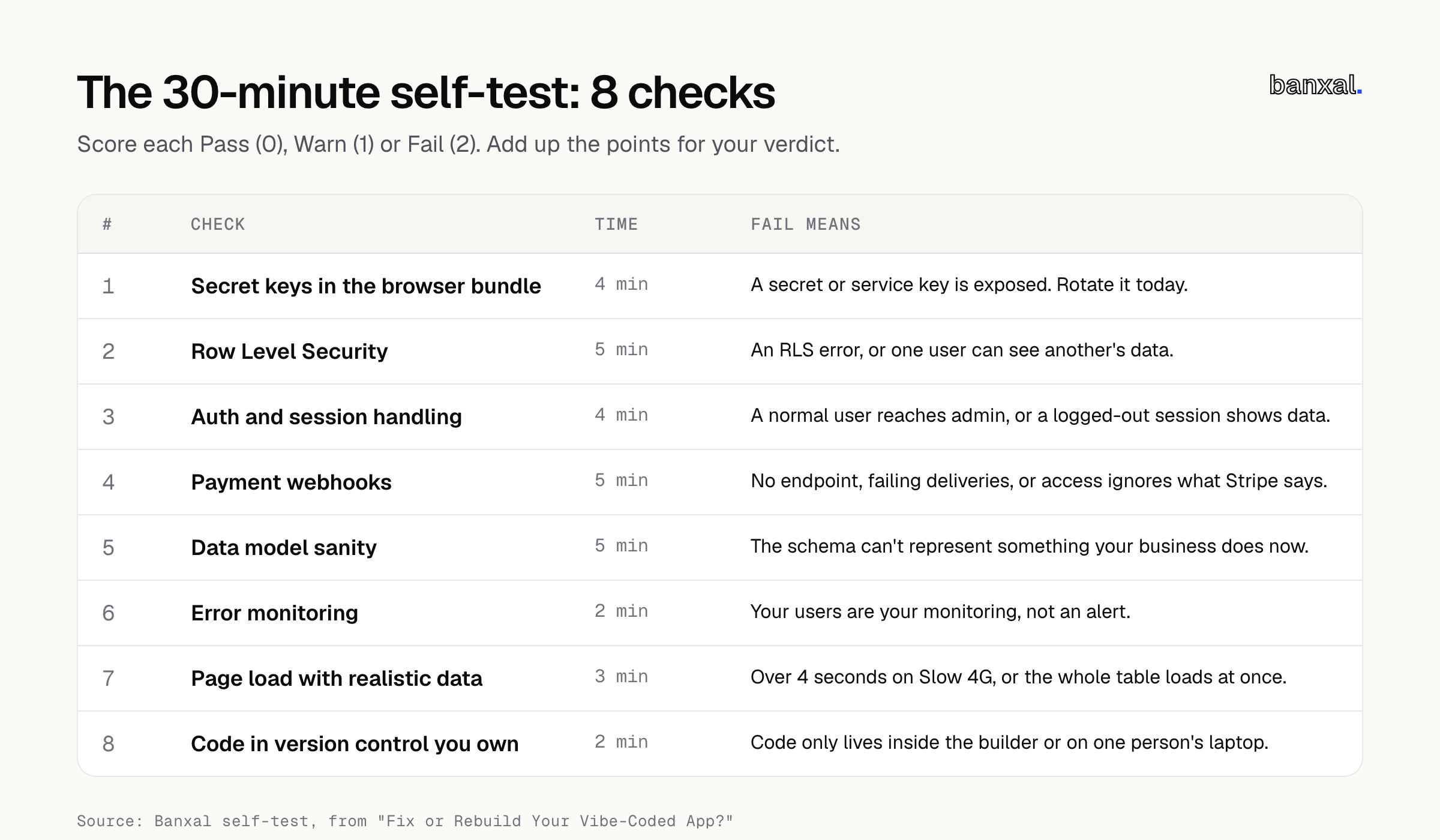
1. Secret keys in the browser bundle (4 min)
Anything your app sends to the browser can be read by anyone who visits it.
- Open your live app in Chrome. Press F12 to open DevTools, then go to the Sources tab.
- Press Ctrl+Shift+F (Cmd+Option+F on Mac) to search across all files.
- Search for
sk_live,sk_test,rk_live,sb_secret_,service_roleandsecret. - Open your Supabase project’s API keys page. Copy the first 20 or so characters of the secret / service_role key and search for those too. Legacy Supabase keys are encoded, so the word “service_role” may not appear in plain text.
Pass: you only find publishable keys (pk_live_, sb_publishable_, the anon key). Stripe and Supabase both say these are safe to expose (Stripe, Supabase).
Fail: any secret, restricted or service key shows up. Rotate it today, before anything else.
2. Row Level Security (5 min)
Supabase’s own docs are blunt: a table without RLS “is readable and writable by any role with a grant on it” (Supabase RLS).
- In the Supabase dashboard, open Advisors → Security Advisor. Look for errors like RLS Disabled in Public or Sensitive Columns Exposed (Supabase Advisors).
- Run the two-account test. Sign up as User A and create a record (an invoice, a project, a message) and copy its URL. Then sign in as User B in a private window and open that URL.
Pass: the advisor is clean and User B sees nothing. Warn: the advisor shows warnings, but the two-account test holds. Fail: any RLS error, or User B can see A’s data. One catch: Lovable’s built-in scanner only checks whether a policy exists, not whether it actually blocks access (Superblocks). The two-account test is what proves it works.
3. Auth and session handling (4 min)
- Log out, press Back, then reload a private page. Do you still see data?
- Signed in as a normal user, type
/admin(or whatever your admin route is) straight into the address bar. - Run a password reset from start to finish. Does the email arrive, and does the link expire after you’ve used it?
Pass: all three behave. Warn: the reset flow is flaky. Fail: a normal user can reach admin pages, or a logged-out session still shows data.
4. Payment webhooks (5 min)
A webhook is the message Stripe sends to your app’s server when a payment succeeds or a subscription changes. Many prototypes skip it and unlock paid features when the browser lands on the “success” page, which breaks the moment someone closes the tab.
- In Stripe, open Workbench → Webhooks. Is an endpoint registered at all? Open Event deliveries and look for anything marked Failed or Pending (Stripe webhooks).
- In a sandbox, start a checkout, pay with a test card and close the tab before the redirect finishes. Does the account still upgrade?
- Cancel that test subscription from the Stripe dashboard. Does the app take away access?
Pass: an endpoint exists, deliveries succeed and both tests behave. Fail: there’s no endpoint, deliveries are failing, or access doesn’t follow what Stripe says.
5. Data model sanity (5 min)
This is the check that decides fix versus rebuild. Open Supabase’s Table Editor and look for:
- Tables named after screens (
dashboard_data,page_two) instead of things in your business (customers,orders). - The same fact stored in several places, like a customer’s email in four tables.
- Lists crammed into one text or JSON column.
- User-owned tables with no column saying who owns each row.
- Something your business does now that the schema can’t represent, such as teams, multiple locations or more than one price per product.
Pass: none of these. Warn: one or two, and they’re contained. Fail: the last bullet is true, or most of the others are.
6. Error monitoring (2 min)
Who finds out first when something breaks, you or your users? In DevTools, search the Network tab for sentry, logrocket or bugsnag, then check whether you’ve ever actually received an alert.
Pass: errors reach you automatically. Fail: your users are your monitoring.
7. Page load with realistic data (3 min)
Fill a test account with the amount of data your heaviest customer has. In DevTools, set Network throttling to Slow 4G and load your busiest page.
Pass: the main content appears within about 2.5 seconds. Google’s web.dev counts Largest Contentful Paint at 2.5s or less as “good” and over 4s as “poor” (web.dev). Warn: 2.5 to 4 seconds. Fail: over 4 seconds, or the Network tab shows the page downloading an entire table at once.
8. Code in version control you own (2 min)
Is your code in a GitHub repository under your account or organisation? Lovable can create a private repo on your GitHub with two-way sync (Lovable docs). Bolt and Cursor projects should be in a repo too.
Pass: you own the repo and can see a history of changes. Warn: a repo exists but sits in a freelancer’s account. Fail: the code only lives inside the builder or on one person’s laptop.
Scoring: ship, fix, refactor or rebuild
Add up your points (maximum 16). These thresholds are our rule of thumb from how these problems usually group together. They aren’t an industry standard.
| Score | Also true | Verdict | What it means |
|---|---|---|---|
| 0–2 | No Fail on checks 1–4 | Ship | Keep building. Add monitoring if you don’t have it. |
| 3–7 | — | Fix | Targeted repairs. Security fails (checks 1–2) go first, this week. |
| 8–16 | Check 5 is Pass or Warn | Refactor | Keep the product and the data, but restructure the code in stages. |
| 8–16 | Check 5 is Fail | Rebuild | The foundation can’t hold your business. Plan a staged rebuild. |
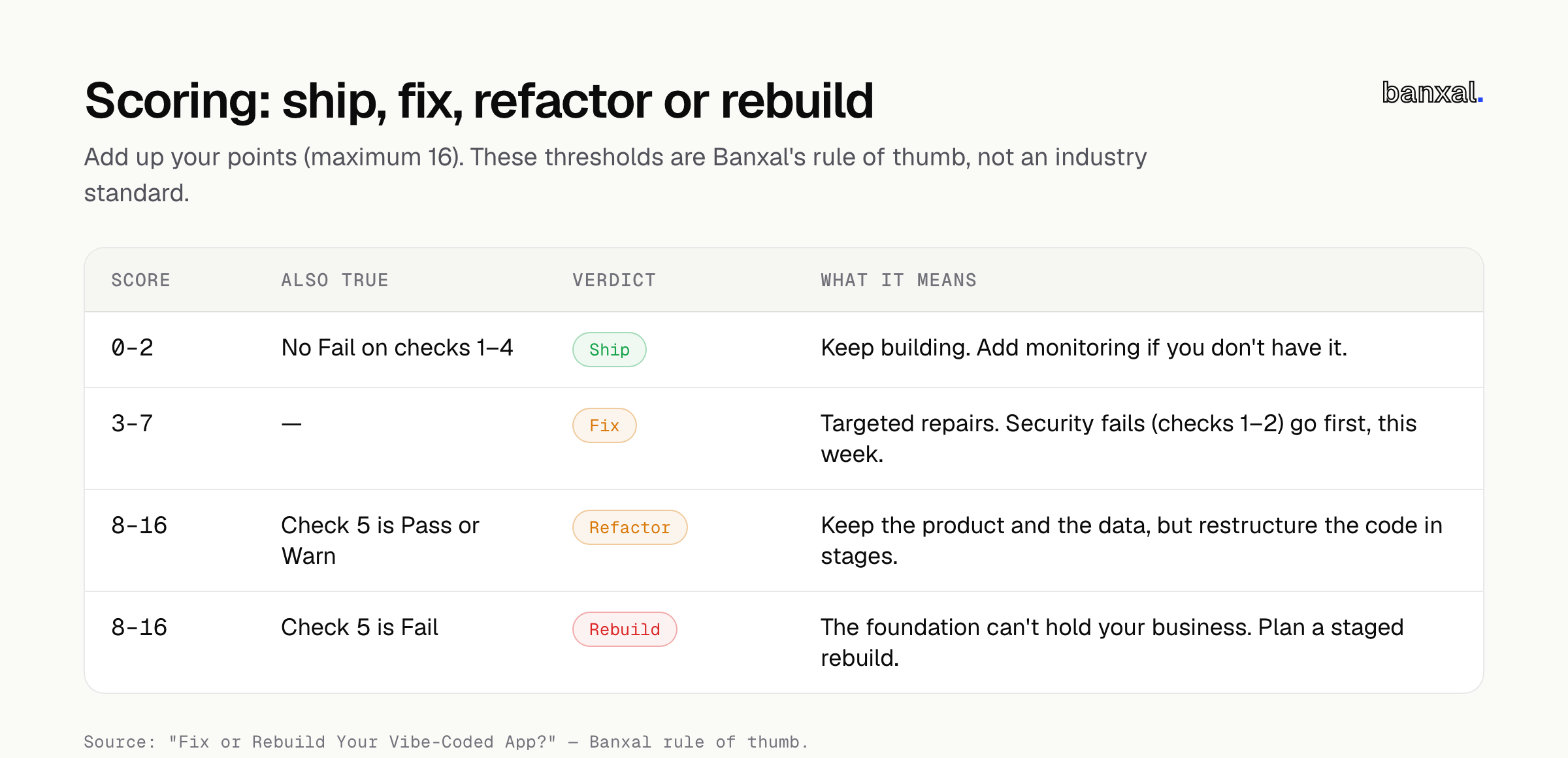
A low score with a Fail on check 1 or 2 still means act today. Rotate the key or turn on RLS, then carry on.
When rebuild is actually right (and when it’s a sales pitch)
Most of the top guides agree, and so do we: the data model is the real test. Axonbuild argues that rebuilding is only justified when your data model “cannot express what the business now does” (Axonbuild). Appmatic puts it as refactor if the data model is sound, rebuild if the architecture can’t support the roadmap (Appmatic).
Rebuild is right when:
- Check 5 fails and your next three features all need the schema changed.
- Every small change breaks something unrelated, and that’s been true for months.
- You can’t get the code out of the platform at all.
It’s probably a sales pitch when:
- Someone quotes a rebuild without reading your code or schema.
- The reasons are about taste (“the code is messy”, “we’d use a different framework”). Messy code that works is a refactor job.
- Exposed keys or missing RLS are given as the reason. Those are fixes, usually small ones.
What to hand a developer
To hand off a Lovable app to a developer (or a Bolt or Cursor one) without paying for discovery twice, send:
- Your self-test scores, with screenshots of anything that failed.
- Admin or collaborator access to the GitHub repo, Supabase, Stripe, hosting and your domain registrar. Use invites, never shared passwords.
- A list of what’s breaking, from user reports, with dates.
- The next three features you need, so they can judge whether the data model will cope.
- Your user and data numbers: active users, the biggest account, the largest tables.
If you’d rather not assemble this yourself, Banxal’s maintenance and growth work starts with the same handover review before anything else is touched.
Fix or rebuild a vibe-coded app: what each option involves
Fixing, refactoring and rebuilding a vibe-coded app differ in what changes, what you keep, and what it costs. Cost ranges below are other agencies’ published figures, not ours, and your app may differ.
| Fix | Refactor | Rebuild | |
|---|---|---|---|
| What changes | Specific broken items | Code structure, tests, deployment | Code and usually the data model |
| What you keep | Everything | Product, data, most UI | Product knowledge, users, migrated data |
| Risk | Low | Medium | High: data migration and two systems running side by side |
| Published ranges | Axonbuild: 6–12 hour repairs at $240–$960 each | Appmatic: 4–10 weeks, $15,000–$40,000 | Appmatic: 8+ weeks, $40,000+ |
Axonbuild’s advice on the cost to fix a vibe-coded app is simple arithmetic: count your blocking problems, multiply by the cost per repair, and compare that with a rebuild quote (Axonbuild). Appmatic lists a separate code audit at 1–2 weeks from $2,500 (Appmatic).
FAQ
Is my Lovable app production ready if the Security Advisor is clean? Not on that alone. The advisor finds missing RLS, but it can’t tell you whether your policies match your business rules. Run the two-account test, and check payments and auth as well.
Can I run an AI-built app security check myself? You can do the first pass. Checks 1–4 above catch the issues behind the best-known incidents. A developer still needs to review webhook signature checks and server-side logic, because that can’t be seen from the browser.
How long does it take to fix a vibe-coded app? Isolated issues such as a leaked key or a missing policy often take hours. The published ranges above put a fuller hardening at weeks. Your score is a better guide than any average.
Next step
If your score says fix or refactor, the next step is a code review and handover conversation. Bring your self-test results. Banxal builds and hardens web apps and SaaS products, and can look after them afterwards through ongoing maintenance. We’ll tell you plainly if a rebuild isn’t needed. Talk to us about your app.