A customer asks the chatbot on your website if you’re open on the bank holiday Monday. It answers straight away and politely: yes, 9am to 5pm.
You’re closed. The bot found its answer in an old opening-hours PDF that nobody remembered was still in the shared folder.
The AI did its job. The data was the problem. Most guides to building a chatbot trained on your own data stop at the upload button. This post covers what comes before it: how these chatbots work in plain English, a data-readiness checklist, a hypothetical worked example, and an honest test of whether you need one at all.
TL;DR
- It isn’t really “trained” on your data. Most of these chatbots use RAG (retrieval-augmented generation). When someone asks a question, the system looks up matching passages in your documents and answers from them. The AI model itself never changes.
- Your documents decide the quality. If a file is outdated, contradicts another file or contains private details, the bot will repeat it to customers, and it will sound sure of itself.
- Try the simple option first. If customers mostly ask the same short list of questions, an FAQ widget may be enough. If all your material is small, you can often give the AI the whole lot at once and skip RAG.
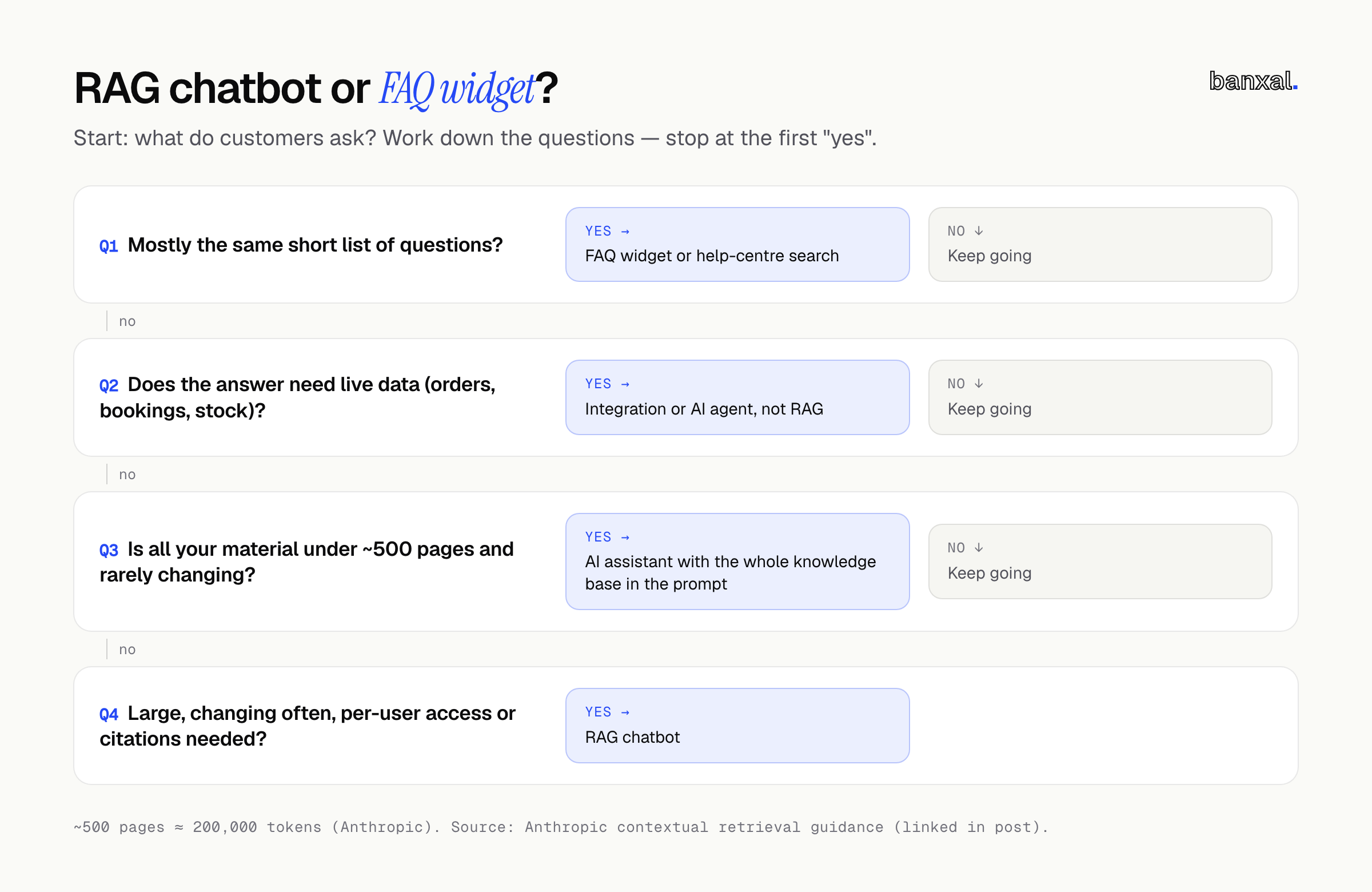
Do you actually need a RAG chatbot — or will an FAQ widget do?
Often you don’t — there are three options, each more work to run well than the last.
1. An FAQ widget or help-centre search. You write the answers; the widget shows them. Nothing is generated, so nothing is made up. If most questions are repeats (“Do you deliver to…?”, “What’s your returns window?”), this is predictable and cheap.
2. An AI assistant that reads everything, every time. If your material is small, skip retrieval and give the AI all of it with each question. Anthropic: “If your knowledge base is smaller than 200,000 tokens (about 500 pages of material), you can just include the entire knowledge base in the prompt” (Anthropic). The trade-off is that you pay for reading it on every message. Our guide to AI agent cost per month shows how to work that out.
3. A RAG chatbot. Worth it when your material is too big for one prompt, changes often (stock, prices, policies), needs to be shown to some people and hidden from others, or answers must cite their source.
One more check: if answering means looking something up in a live system (“Where’s my order?”, “Is Tuesday at 3pm free?”), you’re not dealing with a document problem. You need an integration or an agent. See Zapier, n8n or an AI agent.
How a chatbot trained on your own data actually works
A correction first: for most of these tools, “trained on your own data” isn’t quite accurate. AWS describes RAG as having a model reference “an authoritative knowledge base outside of its training data sources before generating a response”, “all without the need to retrain the model” (AWS). IBM draws the same line: “RAG lets an LLM query an external data source while fine-tuning trains an LLM on domain-specific data” (IBM).
Think of a capable new hire with a filing cabinet. They don’t memorise it; when a question comes in, they pull the right folder and answer from that page. Updating is cheap (swap the page), and the cabinet is the weak point (a bad page means a bad answer).
Here’s the pipeline behind that picture.
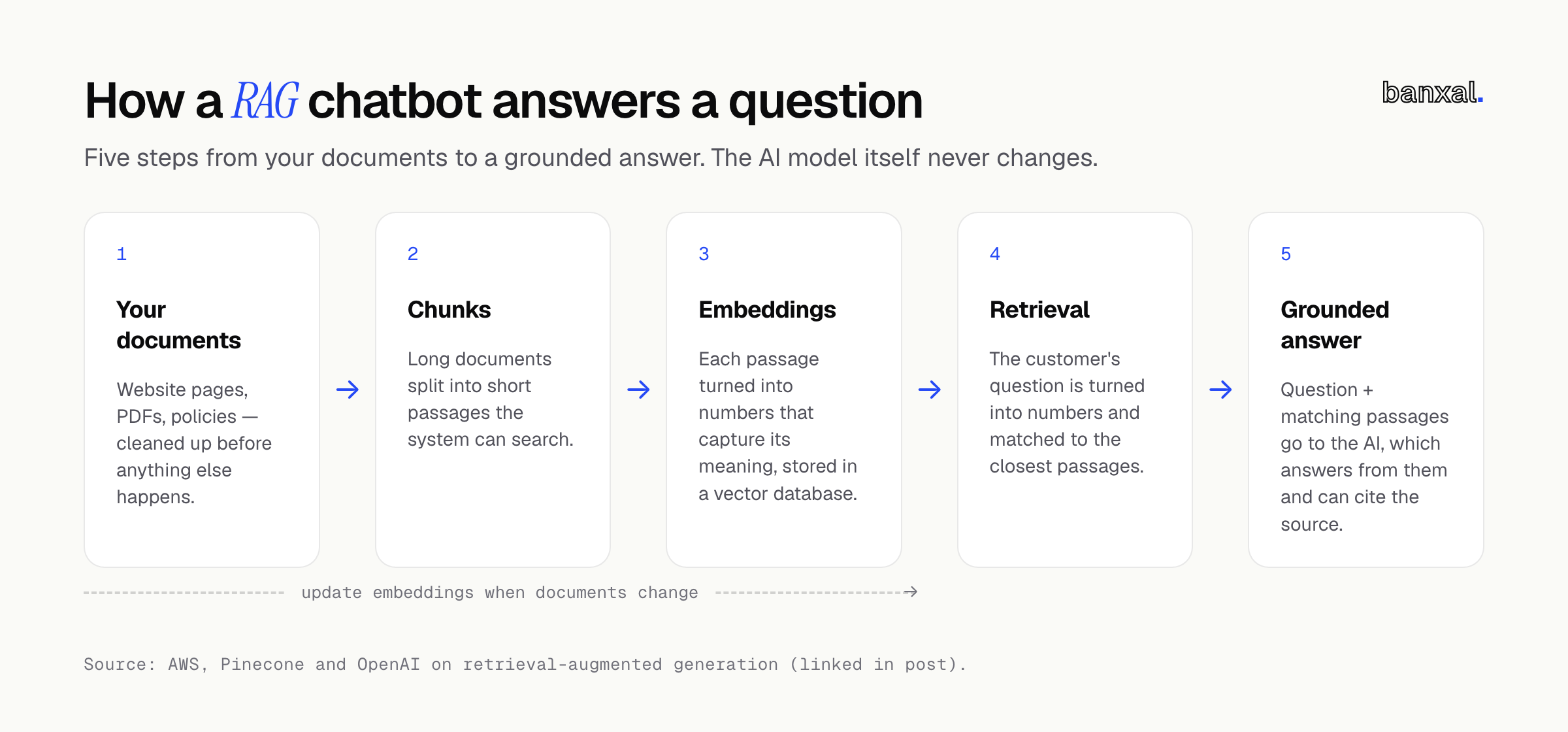
- Documents. Gather your source material and clean it up. Pinecone’s walkthrough describes cleaning the data before anything else happens (Pinecone).
- Chunks. Long documents are split into short passages. OpenAI’s hosted version, for example, splits files into 800-token pieces (a token is roughly a word or part of a word) with a 400-token overlap by default (OpenAI).
- Embeddings. Each chunk is turned into a list of numbers, “a numerical representation of the data’s meaning” (Pinecone), and stored in a vector database (AWS).
- Retrieval. The customer’s question is turned into numbers the same way and matched against the stored chunks. This is how “Can I bring my dog?” can find a passage titled “Pet policy” even though the words barely overlap. OpenAI notes that semantic search surfaces similar results “even when they match few or no keywords” (OpenAI).
- Grounded answer. The question and the matching passages go to the AI model, which writes the answer from them. Both AWS and IBM point out that RAG systems can cite their sources, so you and your customers can check them.
Two things that trip up real chatbots
Chunks lose their context. Anthropic’s example is a passage that reads, on its own, “The company’s revenue grew by 3% over the previous quarter.” Which company? Which quarter? (Anthropic). The small-business version: a price-list line saying “£60, includes follow-up” whose heading got split off. Anthropic’s fix was to add context to each chunk before storing it and pair meaning-based search with keyword search. In their tests that cut failed retrievals by 49% (67% with an extra re-ranking step). You can do a version of this yourself in how you write your documents.
Exact codes need exact matching. Search by meaning can miss precise identifiers. Anthropic’s example is “Error code TS-999”, which keyword matching finds reliably. If customers ask about SKUs, part numbers or plan names, add keyword search too.
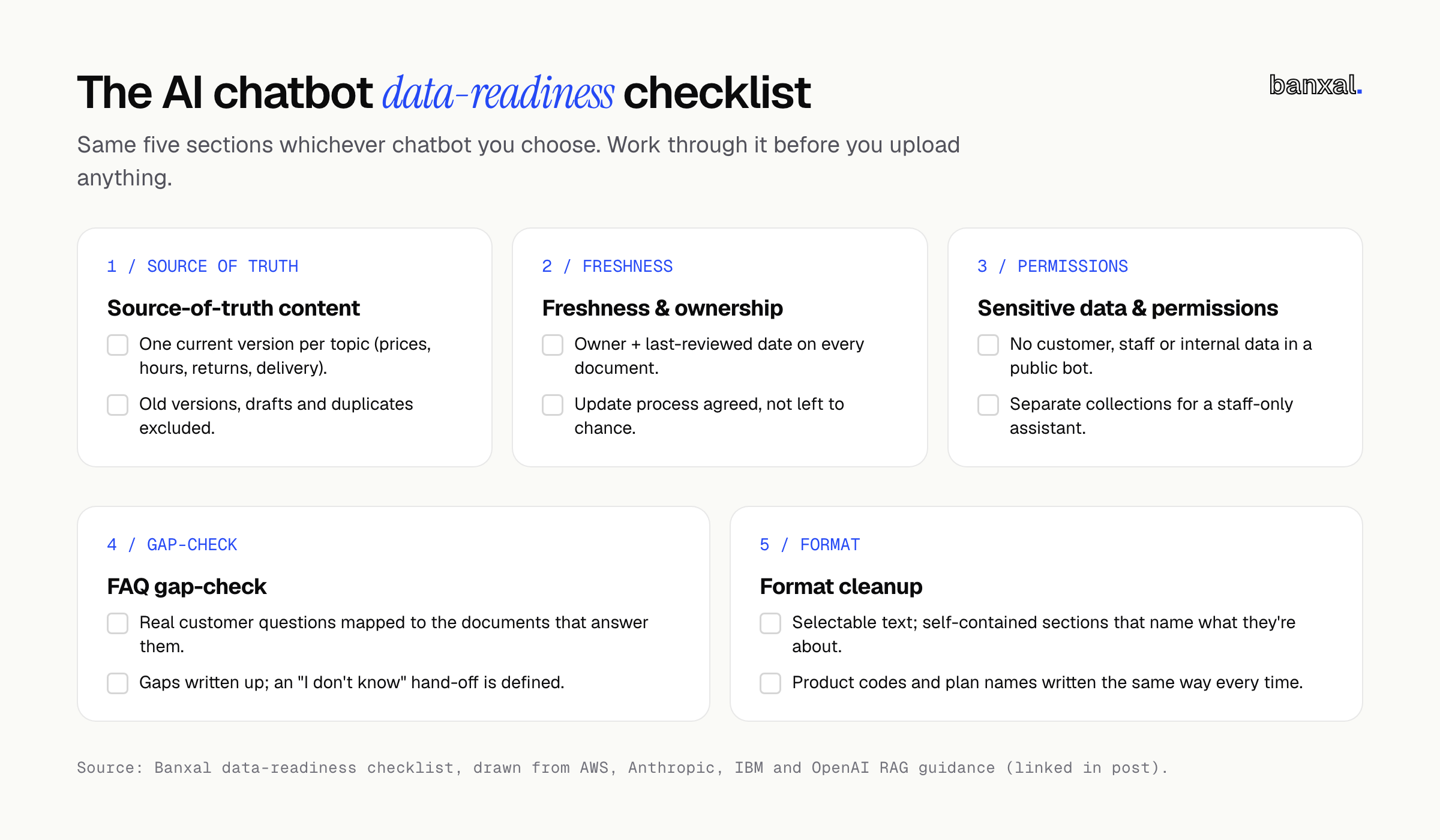
The data-readiness checklist
This decides whether your chatbot gives good answers, whichever tool you choose. Go through it before you upload anything.
1. Source-of-truth content
- List every place answers live today: website pages, help docs, PDFs, policy documents, saved email replies, and the things only staff know.
- Choose one current version for each topic: prices, hours, returns, delivery, service descriptions.
- Exclude old versions, drafts and “v2-final-FINAL” duplicates. If two documents disagree, the bot may quote either one.
2. Freshness and ownership
- Give every document an owner and a “last reviewed” date.
- Decide how changes reach the bot. AWS describes keeping RAG data current by updating the documents and their embeddings “through automated real-time processes or periodic batch processing” (AWS). Either works; having no process doesn’t. As IBM puts it, “Knowledge bases must be continually updated” (IBM).
- Flag anything seasonal or time-limited, such as holiday hours, promotions and price changes. These cause the most embarrassing wrong answers.
3. Sensitive data and permissions
- Assume that anything in the knowledge base can be shown to anyone who can talk to the bot, unless your setup deliberately filters it.
- Remove customer records, staff details, internal pricing or margins, contracts, and anything with passwords or account numbers.
- If you want a staff-only assistant as well as a public one, keep them in separate collections, or use a setup that filters by tags. OpenAI’s version, for example, lets you tag files and filter searches “by user, region, date” and similar (OpenAI).
- Protect the vector database as carefully as the original files. IBM warns that if it’s breached, “attackers can reverse the vector embedding process and access the original data” (IBM).
4. FAQ gap-check
- Pull together a few weeks of real customer questions from your inbox, chat logs, contact form and phone notes.
- For each question, find the document that answers it. Mark the ones with no answer.
- Write the missing answers. A bot can’t retrieve what doesn’t exist, and without a source AWS notes models can present “false information when it does not have the answer” (AWS).
- Decide what the bot does when it doesn’t know: offer a contact form, phone number or hand-off to a person.
5. Format cleanup
- Use real text. Common formats like PDF, Word, plain text and Markdown are widely supported (OpenAI). Quick test: if you can’t select the text in a PDF, assume the chatbot can’t read it either.
- Make each section make sense on its own. Name the service, product or location in the passage, not just in a heading three pages up. This is the do-it-yourself version of the context fix above.
- Turn complicated tables into plain sentences where you can (“Hygiene appointment at the Northside clinic: 30 minutes, £X”).
- Write product codes, plan names and policy names the same way every time.
Worked example (hypothetical): a small dental practice
An illustrative scenario, not a client. Imagine a small dental practice with two clinics. The front desk spends much of the day answering the same calls about prices, opening hours, accepted insurers and how to prepare for a procedure. The owner wants “a chatbot trained on our website and leaflets.”
The gate. Questions repeat, but answers depend on the clinic and the treatment, so a fixed FAQ feels stiff. Booking questions need the live diary, so they route to the existing booking link instead. Everything else (website pages, a price list, a dozen leaflets) is well under 500 pages, so no RAG yet — an assistant with the whole knowledge base in the prompt will do for version one.
The checklist turns up the real work:
- Source of truth: there are two price lists in the shared drive, last year’s and this year’s. The old one is removed.
- Freshness: the practice manager becomes the owner of the price list and opening hours, and reviews them each quarter and before every bank holiday.
- Sensitive data: the staff handbook was in the “upload” folder. It contains staff mobile numbers and internal procedures, so it comes out.
- Gap-check: going through a few weeks of phone notes shows “Do you take my insurance?” is one of the most common questions, and no document answers it. The team writes a one-page insurer list.
- Format: the aftercare leaflets turn out to be scanned images. They’re retyped as text, and each one names the procedure in its first line.
None of this needed an engineer, though skipping it would have produced wrong answers. If the practice later adds clinics or a staff-only assistant, the cleaned-up content moves straight into a RAG setup.
Platform vs. custom build: what changes once your data is ready
Once your data is ready, picking the tool is the easier decision — the work above carries over whichever you choose.
| No-code chatbot platform | Hosted retrieval API (e.g. OpenAI file search) | Custom RAG build | |
|---|---|---|---|
| Setup | Upload files, paste a snippet on your site | A developer connects files to a model | Designed around your systems |
| Chunking & search | Fixed by the vendor | Adjustable. OpenAI allows 100–4,096-token chunks (OpenAI) | Fully controllable, incl. keyword + meaning-based search |
| Permissions | Usually one bot = one set of files | Tag-based filtering | Per-user access tied to your logins |
| Live data | Rarely | With extra development | Yes, via integrations |
| Best for | Public FAQ-style content | Small teams with a developer | Multiple sources, staff + customer bots, citations |
Running costs: storing the documents is usually the small part. OpenAI’s vector storage, for instance, is free up to 1 GB and $0.10 per GB per day after that (OpenAI). The model’s cost per conversation usually matters more, which is what our cost-per-month guide works through.
A platform is probably enough for public content and simple questions. You’ve outgrown it when you need per-user answers, live system data, reliable exact-code lookups, or a way to test answer quality before customers see it.
Want a second opinion before you build?
Worked through the checklist and still unsure whether you need an FAQ widget, a simple assistant or a full RAG chatbot? Our AI integration & agents team builds chatbots and assistants on your own data, and we’ll tell you plainly if a simpler option will do. Tell us what your customers keep asking.
FAQ
Can I train ChatGPT on my own business data?
You usually don’t need to. Most “own data” chatbots use RAG: they look up your documents at question time and leave the model unchanged. Fine-tuning, which does change the model, is “computationally expensive and resource-intensive” (IBM) and rarely a small business’s first step.
How much data do I need for a chatbot trained on my own data?
Less than you’d think, but it must be current, consistent and cover the questions people actually ask. Under about 500 pages, Anthropic suggests skipping retrieval and putting it all in the prompt (Anthropic).
Is it safe to put customer data into an AI chatbot?
Keep customer and staff data out of a public bot’s knowledge base entirely. Anything in it can end up shown to anyone. Give staff assistants a separate, access-controlled collection.
How do I stop the chatbot making things up?
Fill the gaps, remove outdated and conflicting documents, have the bot cite sources, and hand over to a person when it can’t find an answer. RAG gives the model real material to work from. It can’t fix missing or wrong material.
What’s the one question your customers ask that you’d most like a chatbot to answer, and is it actually written down anywhere yet? Tell us in the comments.
If you’ve tried a chatbot on your own documents, what tripped it up first: outdated files, missing answers, or something else? Tell us in the comments.