Someone on your team just spent Friday afternoon copying form leads into the CRM. Again. Half your feed says “replace your team with AI agents”; the other half says “just use Zapier”. Both camps are selling something.
Here’s the honest answer to the AI agent vs Zapier small business question: most of your automations don’t need an agent, a few genuinely do, and some shouldn’t be automated at all. The task decides, not the tool. Below is a task-by-task table across Zapier or Make, n8n, custom code and AI agents, plus what each costs to run.
TL;DR
- Ask one question first: does this task need judgment? If every input has one correct, rule-writable output, you want a workflow tool, not an agent.
- Zapier or Make covers most small-business glue work. n8n earns its complexity with heavy branching, self-hosting or data control. Custom code wins at high volume or when the logic is your product.
- Agents cost per run, and that cost varies run to run. Use them where the input is messy and the steps can’t be predicted, with a human checkpoint in front of anything that touches customers or money.
The real question is “does this task need judgment?”
Anthropic, which builds agents for a living, draws a useful line. Workflows are “systems where LLMs and tools are orchestrated through predefined code paths”, while agents are “systems where LLMs dynamically direct their own processes and tool usage” (Anthropic, Building effective agents). Their advice is to find “the simplest solution possible, and only increase complexity when needed”, because agentic systems “often trade latency and cost for better task performance”.
So, in plain terms:
- No judgment needed (form submitted, create CRM contact): a rule-based workflow — cheaper, faster, and it fails the same way every time, making it easy to debug.
- A little judgment on a fixed path (read this email, label it “billing”, “bug” or “sales”): a workflow with one AI step. The path is fixed; only one decision is fuzzy.
- Open-ended judgment (research this prospect and decide what to look at next): an agent. Anthropic describes this as problems “where it’s difficult or impossible to predict the required number of steps, and where you can’t hardcode a fixed path.”
That middle category is where most small-business value sits.
The four options in one sentence each
- Zapier / Make: hosted, no-code “when this happens, do that” workflows across thousands of apps. Zapier lists 10,000+ (Zapier apps).
- n8n: a visual workflow builder you can self-host, with JavaScript and Python code steps and 1,500+ integrations (n8n on GitHub).
- Custom code: a script or service your developer writes, runs on your own infrastructure and keeps in version control.
- AI agent: a language model given tools (search, CRM, email) and a goal, deciding its own steps until finished or stopped.
AI agent vs Zapier for a small business: the decision table
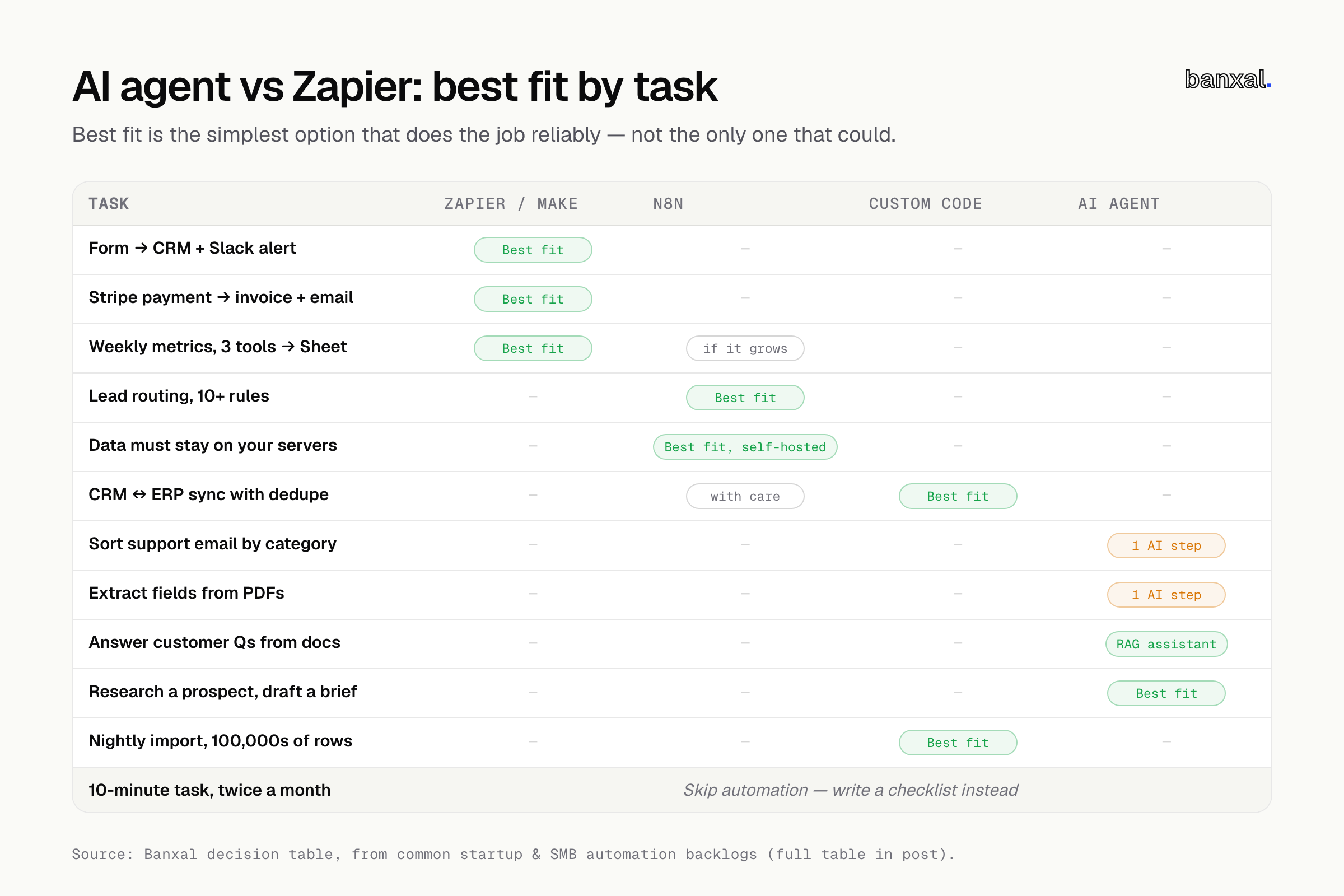
These are the tasks we see most often in startup and SMB backlogs. “Best fit” means the simplest option that does the job reliably, not the only one that could.
| Task | Best fit | Why |
|---|---|---|
| Website form → CRM contact + Slack alert | Zapier / Make | Fixed path, popular apps, five minutes to build. |
| Stripe payment → invoice in accounting tool + welcome email | Zapier / Make | Clear trigger, clear actions, no judgment. |
| Weekly metrics from 3 tools into a Google Sheet | Zapier / Make (n8n if it grows) | Scheduled and predictable; move to n8n once it needs loops. |
| Lead routing with 10+ rules (region, size, source, owner capacity) | n8n | Lots of branching and merging; per-step pricing gets expensive. |
| Workflows touching health, finance or client data that must stay on your servers | n8n (self-hosted) | You control where the data runs. |
| Two-way CRM ↔ ERP sync with deduplication | Custom code (or n8n with care) | Conflict handling and retries are real engineering problems. |
| Sorting inbound support email into categories | Workflow + one AI step | Fixed path; only the labelling is fuzzy. |
| Pulling fields from invoices or PDFs with varying layouts | Workflow + one AI step | Extraction needs a model; everything around it doesn’t. |
| Answering customer questions from your docs and policies | AI assistant on your data (RAG) | Questions are open-ended; answers must be grounded in your content. |
| Researching a prospect across the web and drafting a brief | AI agent | You can’t predict which pages or how many steps it will need. |
| Nightly import of hundreds of thousands of rows | Custom code | Per-task or per-credit billing punishes volume; a script doesn’t care. |
| A 10-minute task done twice a month | Skip automation | Write a checklist; automating costs more than it saves. |
When Zapier or Make is simply correct
If the task is “when X happens in app A, do Y in app B” and both apps are mainstream, Zapier or Make is the right answer — not a compromise.
- Speed to working. A non-developer can build and own it, so it doesn’t wait in an engineering queue.
- Built-in reliability. You don’t run servers. Zapier also only counts a task when an action succeeds: “Failed actions are not counted” (Zapier pricing).
- Low volume is cheap. Zapier says triggers and built-in tools like Filter, Formatter and Paths don’t count as tasks (Zapier pricing).
This is the wrong choice if the workflow has grown past ~10 steps with nested paths, nobody remembers why each step exists, or your task count keeps tipping into the next pricing tier.
When n8n earns its complexity
n8n gives you more control in exchange for more responsibility. It earns it in three situations.
- Self-hosting and data control. The Community edition is free to self-host. Its licence lets you use it “for your own internal business purposes” (n8n Sustainable Use License) — fine for your own automations, but embedding n8n in a product you sell needs its own licence check.
- Branching-heavy logic. Loops, merges, sub-workflows and code steps in JavaScript or Python (n8n on GitHub) handle logic that turns a Zapier canvas into spaghetti.
- Many steps, many runs. n8n bills per execution: “a single run of your entire workflow. It doesn’t matter how many steps are in the workflow” (n8n pricing). A 15-step workflow costs the same as a 2-step one.
The hidden cost: self-hosting means you own updates, backups, uptime and security — if nobody will patch the server, use n8n Cloud or stay on Zapier.
When you actually need an AI agent
You need an agent when all three of these are true:
- The input is messy: free text, varied documents, the open web.
- You can’t write the steps down in advance: the next action depends on what the last one found.
- A wrong answer is recoverable: a human reviews it, or the cost of an error is small.
If only the first is true, skip the agent — put one AI step inside a normal workflow instead. Both Zapier and n8n support this, and it’s easier to test, since the model makes just one decision per run.
When you do build an agent, take Anthropic’s warning seriously: “The autonomous nature of agents means higher costs, and the potential for compounding errors. We recommend extensive testing in sandboxed environments, along with the appropriate guardrails” (Anthropic). In practice that means:
- Start read-only. Let it search and draft; don’t let it send, refund or delete until proven.
- Default to approval. Anything reaching a customer goes through a human queue first.
- Cap the run. Set a max step count and token budget so it can’t loop all night.
- Log every call. You need to see why, when it gets something wrong.
When to just write custom code (or skip automation)
Custom code is the right call when:
- Volume is high. Per-task and per-credit pricing grows with every run; a script on a small server mostly doesn’t.
- The logic is your product. If customers pay for it, it belongs in your codebase with tests, not a no-code canvas only one person understands.
- You need real sync. Two-way sync, idempotent retries and conflict resolution are easier to get right in code.
Sometimes the right automation is none: if a task is rare, changes every time, or lives in a tool with no API, a checklist beats a fragile bot. Quick automations also tend to become unmaintained software; if yours has, our guide on whether to fix or rebuild a vibe-coded app applies here too.
Cost reality check: the shape matters more than the sticker price
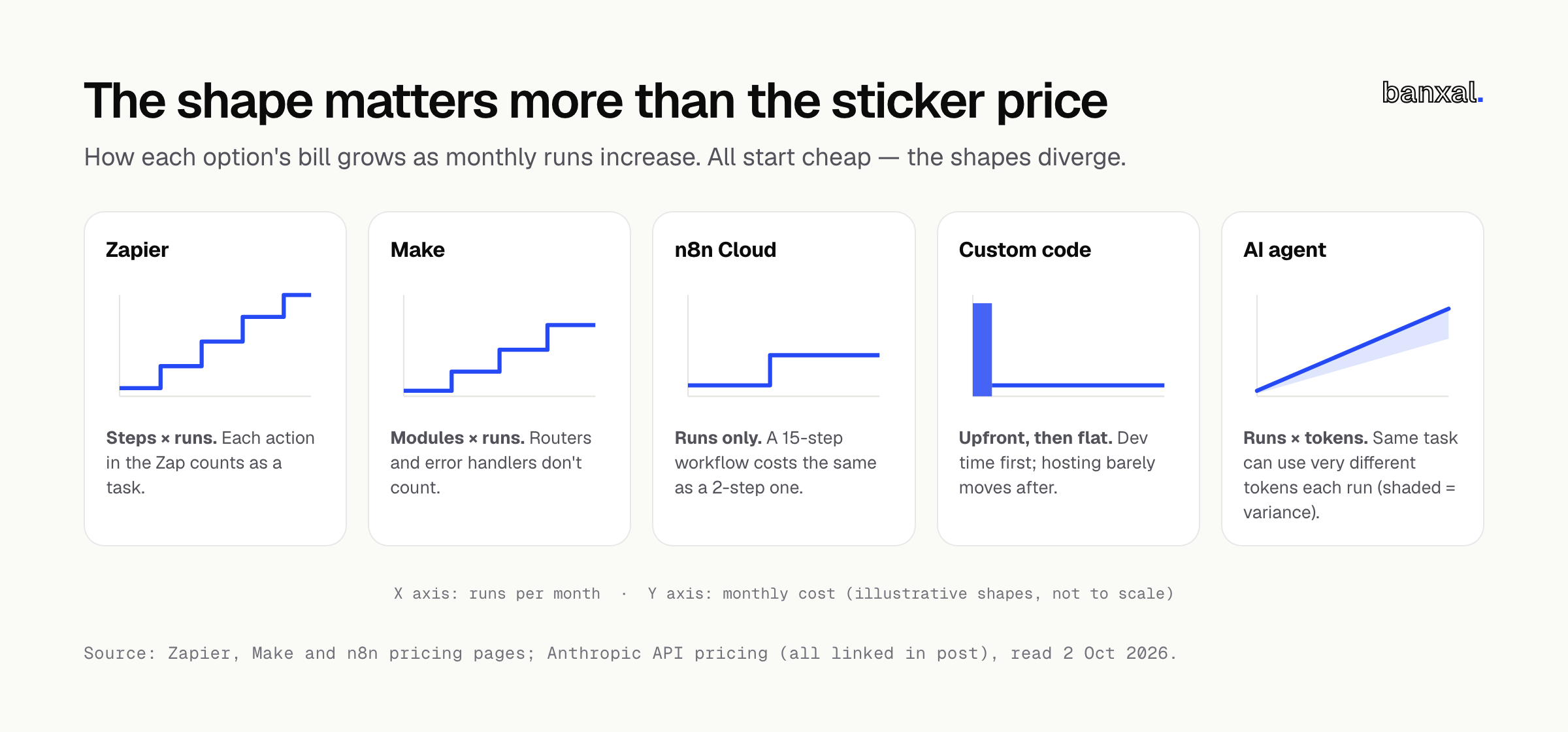
Every option is cheap to start; what matters is how the bill grows. Prices below are from each vendor’s official pricing page on 2 October 2026 — check again before committing, since they change.
| Option | You pay per… | Entry price (official page, 2 Oct 2026) | How the bill grows |
|---|---|---|---|
| Zapier | Task (each successful action) | Free: 100 tasks/mo, two-step Zaps only. Professional: $19.99/mo billed annually ($29.99 monthly) for 750 tasks; $39/mo annually for 1,500 | Steps × runs. With pay-per-task on, overage is 1.25× the base rate on annual plans or 2.5× on monthly (Zapier) |
| Make | Credit (each module action) | Free: 1,000 credits/mo; Make plan from $9/mo for 5,000 credits (Make) | Modules × runs; routers and error handlers don’t count |
| n8n | Execution (whole workflow run) | Cloud Starter €20/mo billed annually for 2,500 executions; Pro €50/mo for 10,000; Community edition free to self-host (n8n) | Runs only. Self-hosting turns it into server costs plus your team’s time |
| Custom code | Developer time up front, then hosting | Depends on scope | Large one-off cost, then low and mostly flat |
| AI agent (via API) | Tokens in and out | For example, Claude Haiku 4.5 is $1 per million input tokens and $5 per million output; Sonnet 5.5 is $2 / $10 (Anthropic pricing) | Runs × tokens per run. The same task can use very different amounts of tokens each time |
A quick worked example: a workflow with a trigger and four actions, run 300 times a month, costs roughly 1,200 Zapier tasks (over the 750 tier, onto the $39/mo annual 1,500 tier), 300 n8n Cloud executions (well inside Starter’s 2,500), or 1,500 Make credits (inside the 5,000-credit tier). None is expensive at this size, but add steps or runs: Zapier’s bill grows on both, n8n’s on one.
For agents, Anthropic publishes its own estimate: about 3,700 tokens per support conversation on Haiku 4.5 comes to “~$37.00 per 10,000 tickets” (Anthropic pricing). Cheap, but that’s roughly one conversation’s worth of tokens. An agent that searches, reads pages and retries can use many times that, and the amount varies per run — budget with a per-run cap, not an average.
A 5-minute self-test
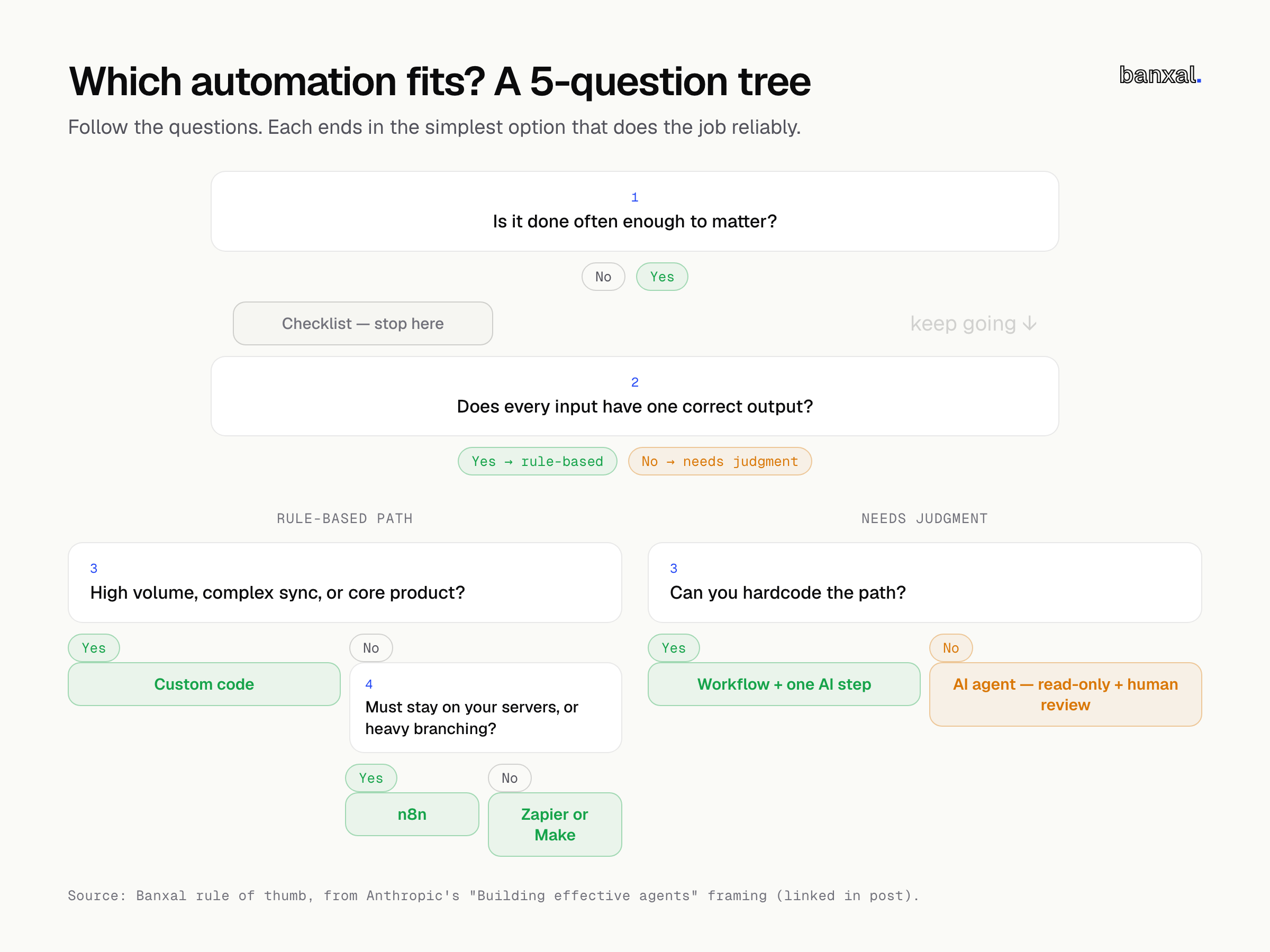
Pick one task from your backlog and answer these five questions.
- How often does it happen? Less than weekly and under 15 minutes? Write a checklist and stop here.
- Could you write every rule on one page? Yes → Zapier, Make or n8n. No → keep going.
- Is only one step fuzzy (classify, extract, summarise)? Yes → a workflow with one AI step.
- Does the path change based on what it finds? Yes → an agent, with read-only tools and human approval to start.
- Is it high-volume, a two-way sync, or part of your product? Yes → custom code, whatever you answered above.
One more check: must the data stay on your servers? If so, use self-hosted n8n or custom code, regardless of your other answers.
Not sure which bucket your process fits?
If a task still doesn’t fit a bucket, or your Zapier account has become something nobody wants to touch, that’s what our automation & integrations work covers — including AI agents with review steps built in, where judgment is genuinely needed. Send us the process and we’ll tell you which option fits, even if it’s “keep using Zapier”.
FAQ
Is an AI agent better than Zapier for a small business?
For most tasks, no — Zapier is cheaper, faster and more predictable for fixed “when X, do Y” workflows. An agent wins only when the input is messy and the steps can’t be decided in advance, like prospect research or open-ended Q&A.
Is n8n cheaper than Zapier?
It depends how the workflow’s built. n8n charges per execution regardless of step count, while Zapier charges per successful action (n8n pricing, Zapier pricing). Long, many-step workflows usually cost less on n8n; simple two-step ones cost about the same, and Zapier takes less setup.
Can I add AI to Zapier or n8n without building an agent?
Yes, and it’s often the best option: put a single AI step (classify, extract, summarise) inside a normal workflow. The path stays fixed and testable, and you pay for one model call per run.
What’s the biggest mistake with AI agents?
Giving them write access too early. Start with read-only tools and human approval, cap steps and tokens per run, and log every action before you let an agent send anything on its own.