
You built the app in Lovable or Bolt. Now you’ve found a developer or agency to take it further, and their first message is: “Can you send me access?”
Before you reply, work out what “access” means. A Lovable or Bolt app lives in several places: the builder, a GitHub repo, a database, a secrets store, a domain, plus payment and email accounts. Hand off a Lovable app to a developer without mapping those, and either they spend their first paid days finding your setup, or you hand over keys you can’t take back.
This guide covers the founder’s side: what to export, lock down and write down before a developer opens the repo.
TL;DR
- Give access, keep ownership. Invite the developer into your GitHub, database and hosting accounts. Don’t transfer the accounts themselves unless you’re selling the app.
- Find your backend first. Lovable Cloud, your own Supabase project and Bolt Database each hand off differently. Neither builder offers a one-click way to move off its built-in database.
- Secrets don’t travel with the code. Lovable secrets are write-only and never sync to GitHub. Make a list of every key, share the keys safely and rotate any that have been pasted into chats.
Why handoff prep matters
Developers bill for discovery: an hour spent asking “which Supabase project is production?” costs the same as an hour building features.
There’s a security reason too: Lovable’s own guidance says “secrets stored in frontend code are visible to users and should be considered compromised” (Lovable security best practices) — a key pasted into a prompt, Slack thread or freelancer email counts the same way.
What moves automatically vs what you must export
The biggest variable is where your data lives — find out first.
- Lovable Cloud. This is Lovable’s built-in backend, “built on Supabase’s open-source foundation” (Lovable Cloud docs). You manage it inside Lovable. We found no documented way to give an outside developer direct access to the dashboard underneath it.
- Your own Supabase project connected to Lovable. Lovable says this route gives you “your own Supabase account and billing, full access to the Supabase dashboard” (Lovable Supabase docs).
- Bolt Database. Bolt “will typically automatically create one as soon as your project needs it” (Bolt databases intro). On Pro or Teams plans you can claim it into your own Supabase organisation (Bolt Supabase docs).
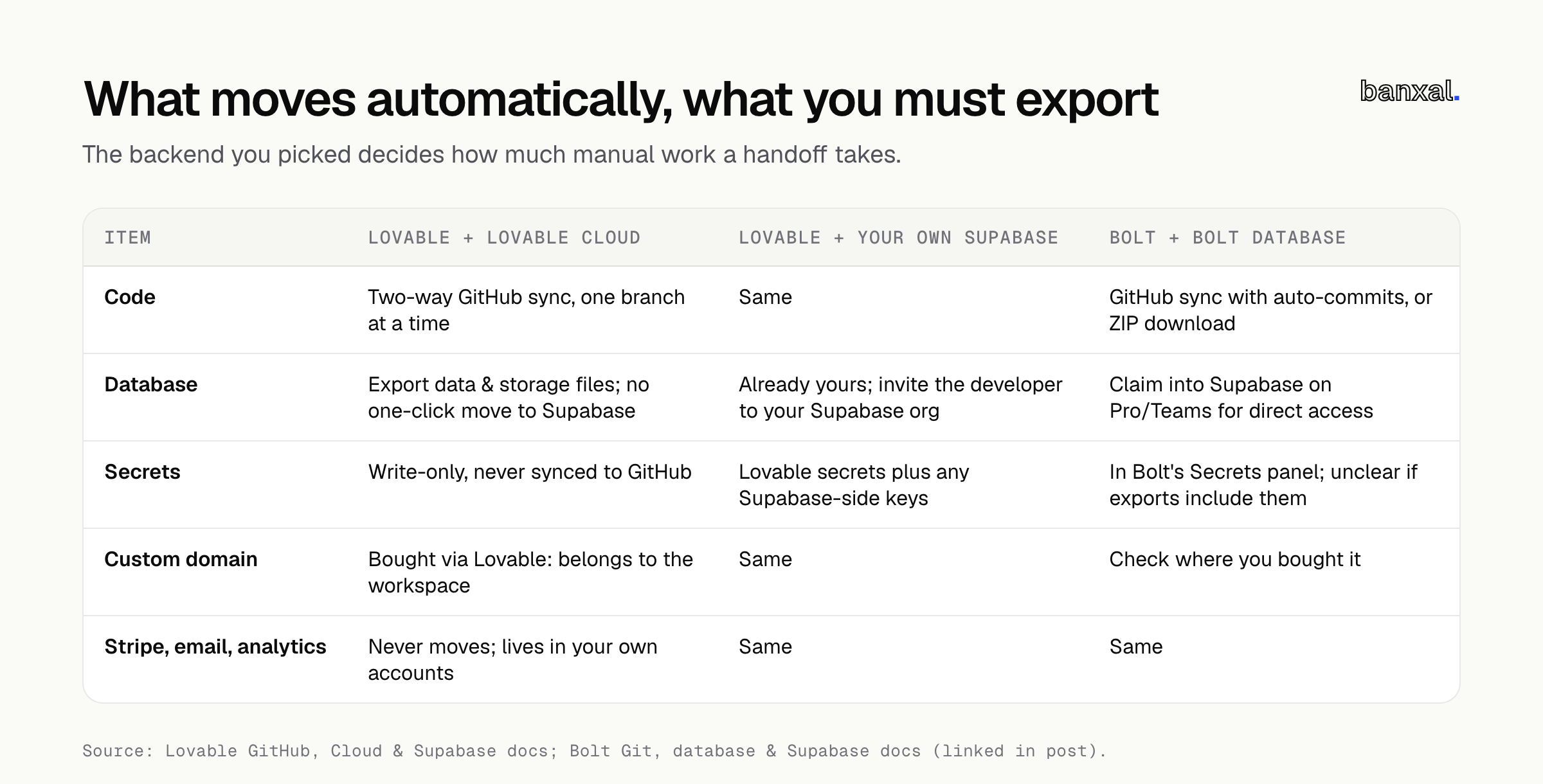
| Item | Lovable + Lovable Cloud | Lovable + your own Supabase | Bolt + Bolt Database |
|---|---|---|---|
| Code | Two-way GitHub sync, one branch at a time | Same | GitHub sync with auto-commits, or ZIP download |
| Database | Export data and storage; no one-click move to your own Supabase | Already yours; invite the developer to your Supabase org | Claim into Supabase (Pro/Teams) for direct access |
| Secrets | Write-only, not synced to GitHub | Lovable secrets plus any Supabase-side keys | In Bolt’s Secrets panel; unclear if included in exports |
| Custom domain | Via Lovable: belongs to the workspace. External: A + TXT at your registrar | Same | Check where you bought it |
| Stripe, email, analytics | Never moves; lives in your own accounts | Same | Same |
Lovable states “there is no one-click migration from the built-in backend (Cloud) to Supabase or the other way” (Lovable Supabase docs), and Cloud’s region can’t be changed once enabled (Lovable Cloud docs). Treat a move to your own Supabase as a scoped migration, not a settings change.
The pre-handoff checklist: access, code, data, docs
Work through this in one sitting; most of it takes a couple of hours and needs no technical skill.
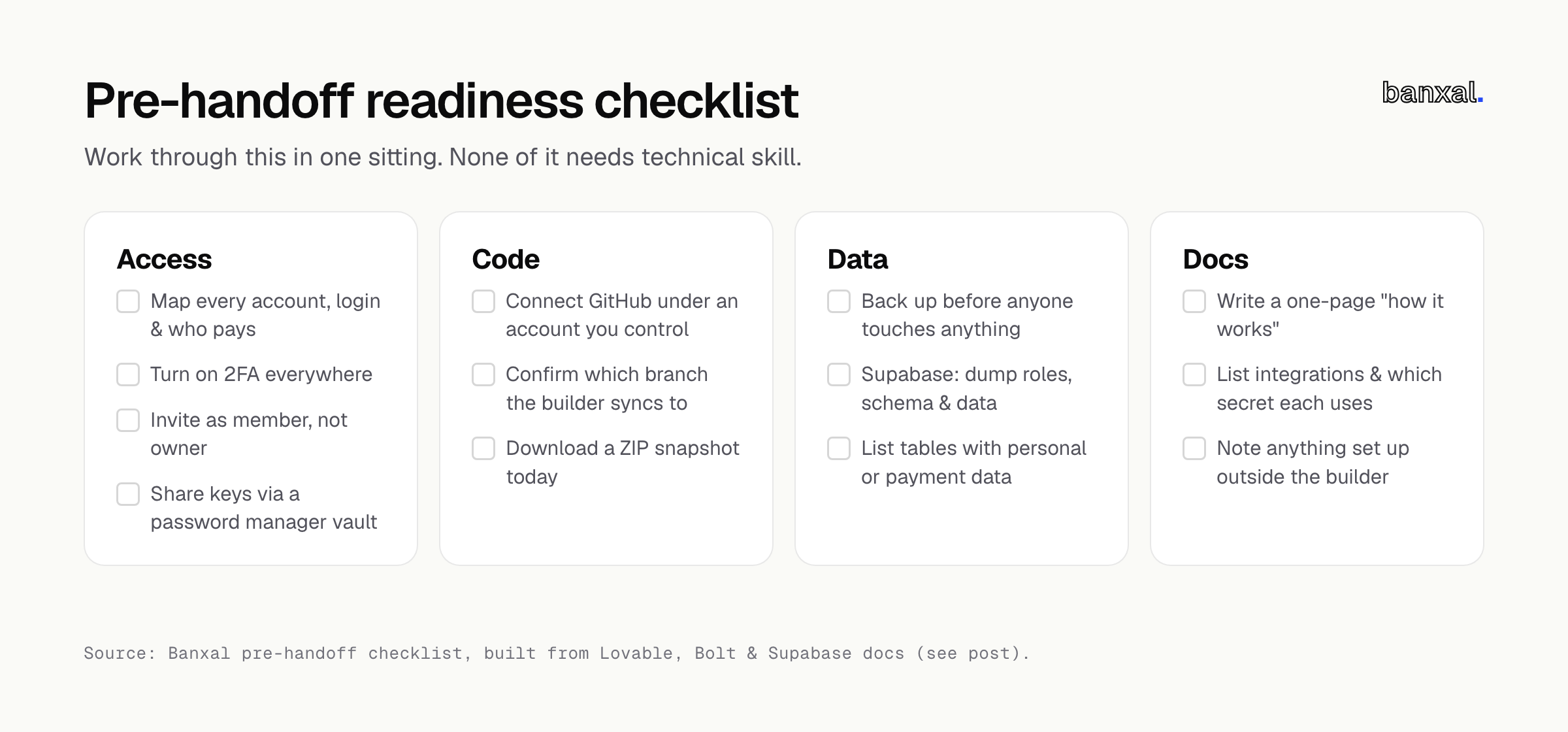
Access
- Write down every account the app touches: builder, GitHub, database, hosting, domain registrar, DNS, Stripe, email provider, analytics and any AI API. Note the login email and who pays for each one.
- Turn on two-factor authentication for every account you own.
- Invite the developer as a member or collaborator, not an owner. Supabase project transfers require you to be the source org’s owner and can lower people’s roles (Supabase project transfer). Keep the project in your org and add the developer to it.
- Choose a safe channel for sharing keys, such as a password manager’s shared vault. Don’t use email, and don’t use a chat app that keeps history forever.
Code
- Connect GitHub if you haven’t, and make sure the repo is in an account or organisation you control.
- Confirm which branch the builder syncs to. Lovable “only edits and syncs one branch at a time” (Lovable GitHub docs).
- Download a ZIP snapshot of the code today and keep it outside the builder.
Data
- Take a backup before anyone touches anything. On a Supabase project you control, the CLI can dump roles, schema and data as separate files:
supabase db dump --db-url "$DB_URL" -f roles.sql --role-only
supabase db dump --db-url "$DB_URL" -f schema.sql
supabase db dump --db-url "$DB_URL" -f data.sql --use-copy --data-only(Supabase backup and restore. The full data command in the docs also excludes two storage tables. Copy it from there.) On Lovable Cloud, use the export option the Cloud docs describe for the database and storage files.
- List which tables hold personal or payment data.
Docs
- Write a one-page “how it works”: who the users are, the three most important flows (signup, the core action, payment), and what’s broken.
- List every integration and which secret it uses, without writing the secret values in the doc.
- Note anything you set up outside the builder, such as Stripe webhooks, DNS records or cron jobs.
How to hand off a Lovable app to a developer: Lovable-specific steps
Decide between collaborator access and moving the project. You can share the project, move it to another workspace, or transfer ownership; the new owner needs the owner, admin or editor role (Lovable project settings). For a normal engagement, share access and keep ownership.
Be careful moving workspaces once GitHub is connected. Moving the project to another workspace breaks the GitHub connection, and reconnecting creates a new repository; disconnecting works the same way (Lovable GitHub docs). Moving the repo itself is safer: sync continues “when your Lovable workspace also has a GitHub connection for the new owner,” and GitHub keeps issues and collaborators and redirects the old URL (GitHub: transferring a repository).
Agree who edits where. Pushes to the active branch flow back into Lovable, so don’t prompt on that same branch while the developer is working.
Rebuild your secrets inventory by hand. Lovable secrets “are write-only: after you save a secret, its value can never be viewed again in Lovable, only replaced or deleted,” and they don’t sync to GitHub (Lovable Secrets docs). If the original key isn’t saved anywhere, generate a new one from the provider. The .env file is different: Lovable commits it so build-time VITE_* values are available, so it must hold only public values.
Check your domain. Domains bought through Lovable “belong to your workspace, not to a single project,” and transferring one out is irreversible from Lovable’s side (Lovable custom domain docs). An outside domain just needs an A record and a _lovable TXT record at your registrar — make sure you, not a past freelancer, can log in there.
Bolt app developer handover: Bolt-specific steps
Export to GitHub. Bolt’s GitHub integration creates a commit “every time you make a change that doesn’t break the project,” and “checks GitHub every 30 seconds for any updates made outside Bolt” (Bolt GitHub docs). Only the project owner can manage it, and disconnecting is permanent — “you can’t manually reconnect it” — so don’t disconnect to “clean things up” before a handoff.
Keep a ZIP as well. Use Export > Download from the project title menu (Bolt projects docs) for a dated snapshot you control.
Don’t transfer to a user unless you mean it. Bolt lets you transfer a project to another user, but “after the recipient accepts the transfer, you won’t be able to access the project or make any further edits” (same page) — that fits a sale, not hiring a contractor.
Handle the database before you change anything. To get the developer into a real Supabase dashboard, claim the Bolt database into your Supabase organisation (requires a Pro or Teams plan and Supabase org owner). Don’t connect a new Supabase project instead: Bolt warns that doing so “will replace the connection, which may cause data loss” (Bolt Supabase docs).
Treat secrets as unknown until checked. Bolt’s Secrets panel keeps values out of users’ browsers (Bolt secrets docs), but Bolt’s docs don’t say whether secrets or .env files end up in GitHub syncs or ZIP downloads. Open both and check — rotate any private key you find.
What a developer checks in the first hour
A good developer runs roughly these checks first — here’s what each finding means.
| First-hour check | Good sign | Bad sign and what it means |
|---|---|---|
| Clone and run the repo locally? | Runs from the README | Fails: expect setup cost before feature work |
| Secret keys in the browser bundle | Only publishable keys | A Supabase secret or service_role key: rotate it today — secret keys “bypass Row Level Security” (Supabase API keys) |
| Row Level Security on user tables | On, with policies per table | Off: any logged-in user may read others’ data |
| Which environment is production? | One clear prod project | Several near-identical projects to untangle |
| Payment webhooks | Signed, handled server-side | Missing: payments can succeed without the app knowing |
If they find a leaked key, follow Supabase’s order: “Fix the root cause of the leak before you rotate anything,” then create the new key, update everywhere, and retire the old one (Supabase API keys) — rotating first just leaks the new key too.
Handoff or rebuild?
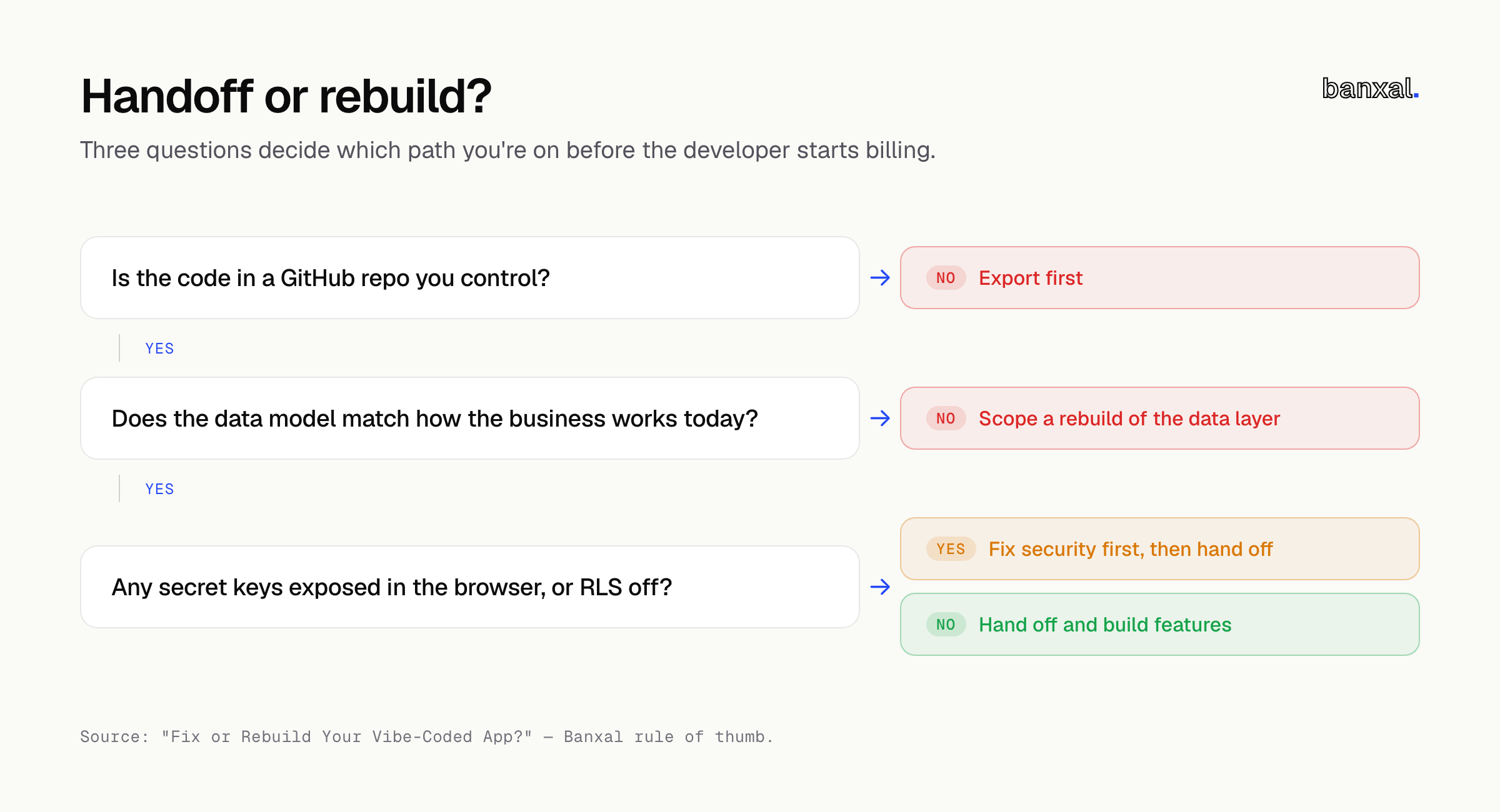
Most apps that reach a handoff need fixing, not replacing. The deciding question is the data model, not the code: if your database still describes how your business works, a developer can harden what you have; if it doesn’t, every fix fights the structure underneath. Run that test — Fix or Rebuild Your Vibe-Coded App? A 30-Minute Self-Test — before the handoff.
FAQ
Can I export a Lovable app to GitHub and keep building in Lovable? Yes. The sync is two-way on one active branch. Lovable can export to a new repo but can’t import an existing one (Lovable GitHub docs).
Should I give my developer my Lovable or Bolt login? No. Invite them under their own accounts to the project, GitHub and Supabase — shared logins make it impossible to later remove just one person’s access.
Do I need to move off Lovable Cloud before a handoff? Not necessarily — only if the developer needs direct database access. It’s a manual job, though: export the data, connect a Supabase project and rebuild the schema (Lovable Cloud docs).
When should I rotate secrets? Rotate any key pasted into a chat, email or prompt before the handoff, and rotate every key the developer had when the engagement ends.
Next step
Want a second opinion before committing budget? Banxal’s development services include a handoff review: we go through your repo, backend and secrets and tell you plainly whether it needs fixing, hardening or a partial rebuild. Get in touch and tell us what you’ve built.