A customer tells you, “You should have an app.” A developer friend says, “Just make the website installable.” An agency sends a proposal for iOS and Android. All three could be right, and all three could waste a year of your budget.
Whether you need a mobile app or a website for a small business comes down to how your customers behave, not to what looks impressive. And the choice isn’t really two-way. There’s a middle option most comparisons skip: a progressive web app (PWA), a website that can be installed on a phone’s home screen, send notifications and work partly offline.
Below is a 10-question scorecard you can fill in over a coffee. Every platform claim was checked against Apple, Google, web.dev, MDN and WebKit documentation on 16 October 2026.
TL;DR
- Many small businesses score into “website” or “PWA”. A native or cross-platform app pays off when customers use you weekly or more, or when you need hardware and background features the web can’t reliably reach.
- iPhone is the deciding constraint for PWAs. Web push on iOS works only after the user adds your site to their Home Screen, so if you need time-critical alerts and your customers won’t do that, a PWA isn’t enough.
- An app adds gatekeepers and ongoing admin. Apple charges 99 USD a year, Google Play has a one-time 25 USD fee, both review your releases, and Apple rejects apps that are little more than “a repackaged website”.
Website, PWA or app: what’s actually different
All three can look identical on a phone screen. The differences show up in four places: how people get it, how you reach them, what it can do on the device, and who has to approve your changes.
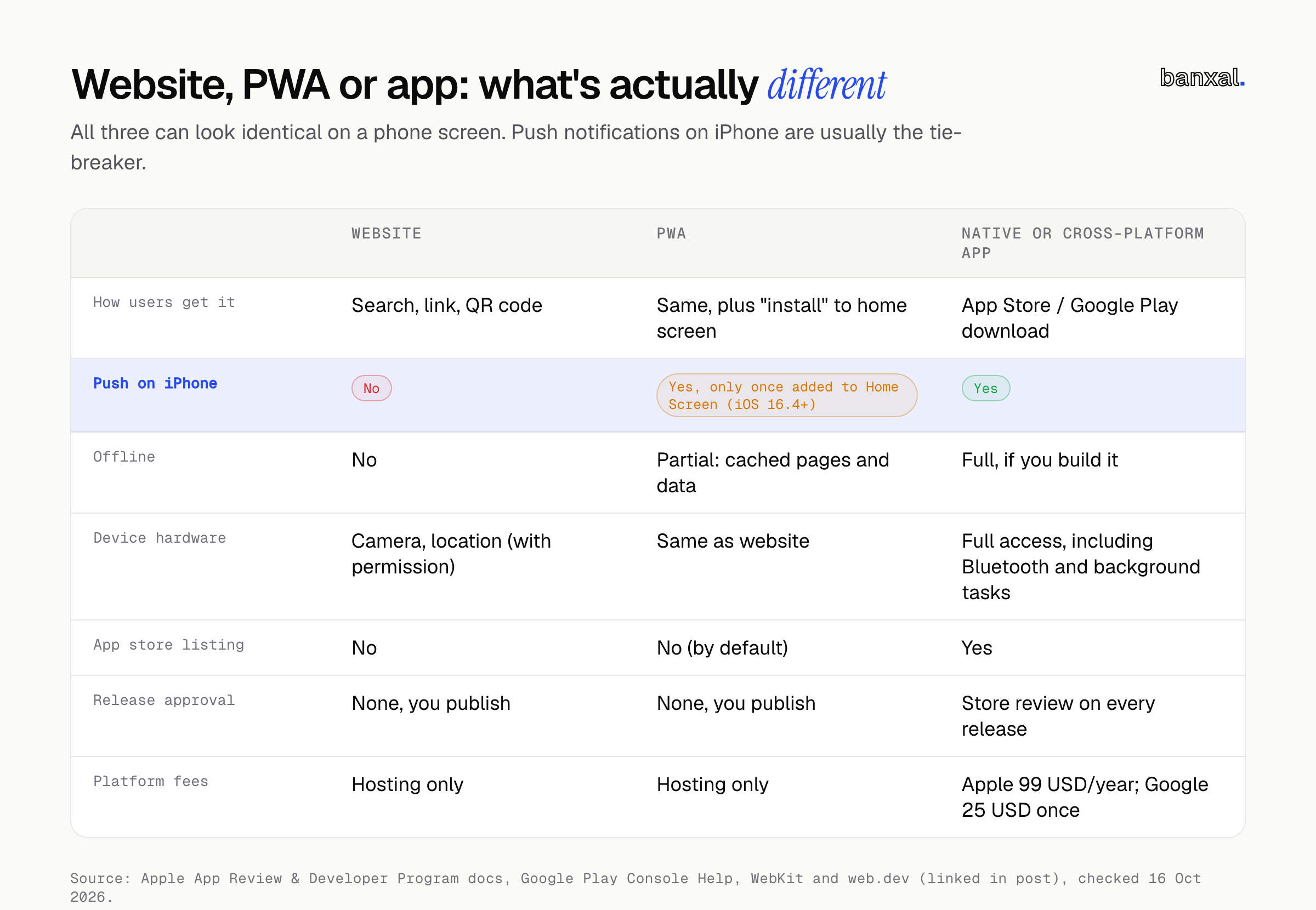
| Website | PWA | Native or cross-platform app | |
|---|---|---|---|
| How users get it | Search, link, QR code | Same, plus “install” to home screen | App Store / Google Play download |
| Push on iPhone | No | Yes, only once added to Home Screen (iOS 16.4+) | Yes |
| Offline | No | Partial: cached pages and data | Full, if you build it |
| Device hardware | Camera, location (with permission) | Same as website | Full access, including Bluetooth and background tasks |
| App store listing | No | No (by default) | Yes |
| Release approval | None, you publish | None, you publish | Store review on every release |
| Platform fees | Hosting only | Hosting only | Apple 99 USD/year; Google 25 USD once |
A few rows need context, because they’re where most outdated advice goes wrong.
PWAs on iPhone are better than their reputation. Since iOS and iPadOS 16.4, a web app added to the Home Screen can ask for push notifications and set a badge count on its icon (WebKit). Since iOS 18.4, Declarative Web Push lets those web apps show notifications without a service worker (WebKit, Safari 18.4; Meet Declarative Web Push). And in iOS 26, “by default, every website added to the Home Screen opens as a web app”, with or without a manifest file (WebKit, Safari 26).
The catch is the install step. On iPhone, notification permission comes after the user has added your site through the Share menu, and the request has to follow a direct tap, such as a “subscribe” button (WebKit). There’s no automatic install prompt to lean on. Many customers will never find that menu without help.
Android is more forgiving. Chrome offers an install prompt when the site is served over HTTPS, has a manifest with a name, 192px and 512px icons, a start_url and a standalone-style display mode, and the user has tapped the page and spent at least 30 seconds on it (web.dev). Here’s the minimum manifest:
{
  "name": "Riverside Yoga",
  "short_name": "Riverside",
  "start_url": "/",
  "display": "standalone",
  "icons": [
    { "src": "/icon-192.png", "sizes": "192x192", "type": "image/png" },
    { "src": "/icon-512.png", "sizes": "512x512", "type": "image/png" }
  ]
}
EU iPhones still get web apps. In early 2024 Apple said iOS 17.4 would drop Home Screen web apps in the EU, then reversed: “we will continue to offer the existing Home Screen web apps capability in the EU” (Apple’s statement, via 9to5Mac). We found no later Apple notice changing that, and WebKit’s iOS 26 web-app changes carry no regional exception.
Hardware is where the web still falls short. MDN marks Web Bluetooth as experimental and “not Baseline because it does not work in some of the most widely-used browsers” (MDN). The same applies to Background Sync, the API that lets a web app finish a task once the connection returns (MDN). If your idea depends on either, plan for an app.
The 10-point scorecard: mobile app or website for a small business?
Score each question 0, 1 or 2. Answer for your typical customer, not your most enthusiastic one. Higher scores point towards an app.
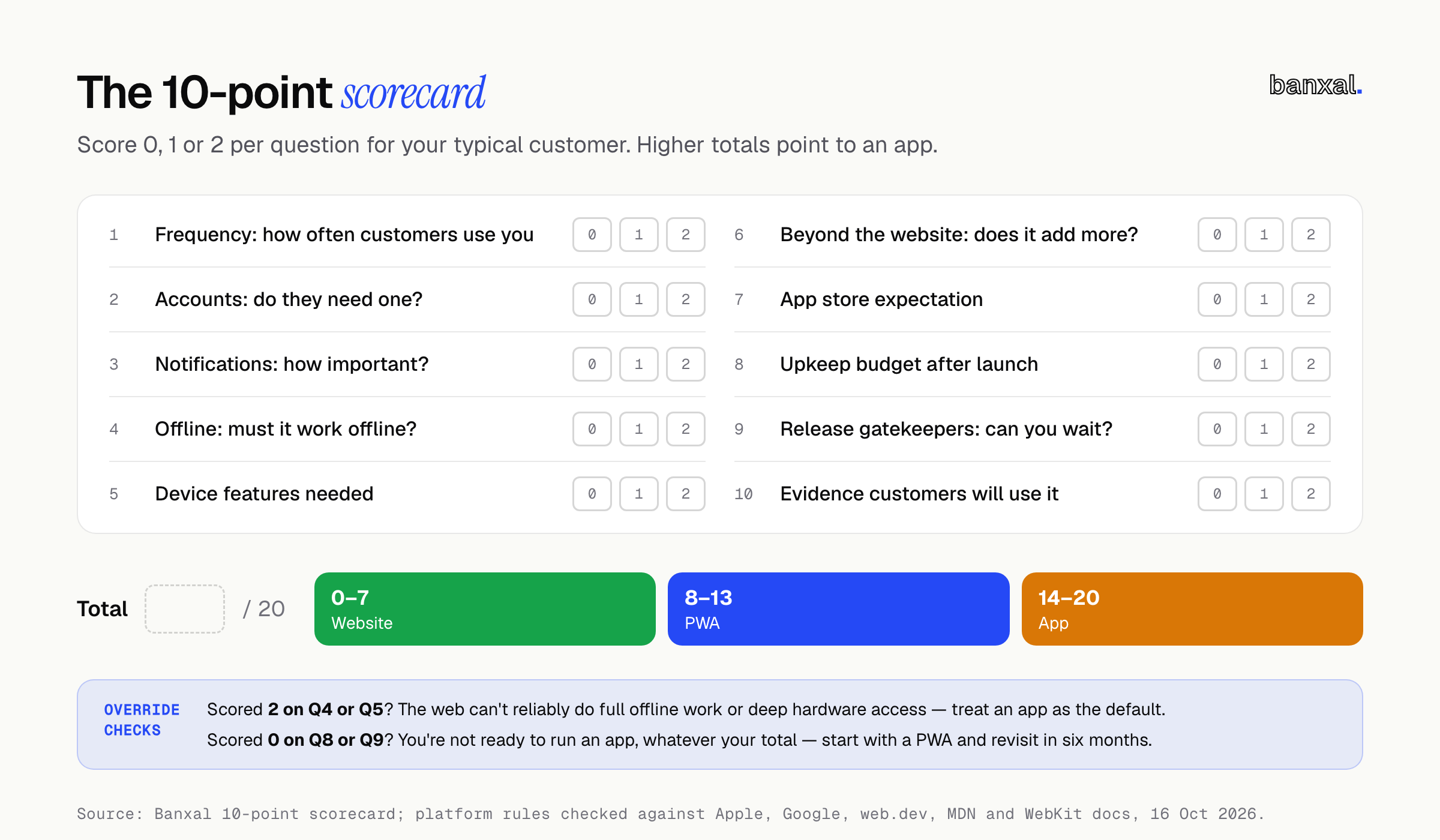
1. How often does a typical customer use you? 0 = a few times a year. 1 = about monthly. 2 = weekly or more.
2. Do customers need an account? 0 = no, they browse, call or enquire. 1 = it’s useful (order history, saved details). 2 = it’s the core of the relationship (memberships, loyalty, bookings).
3. How important are notifications? 0 = email or SMS is fine. 1 = push would help, and you can ask customers to add you to their Home Screen. 2 = time-critical alerts are central (“your order is ready”, “your driver is outside”) and you can’t count on iPhone users installing a web app.
4. Does it need to work offline? 0 = no. 1 = showing cached information is enough (a menu, a schedule, last order). 2 = people must complete real work offline and sync later, like a field team logging jobs in a basement.
5. What device features do you need? 0 = none, or photo upload. 1 = camera or location while the screen is open. 2 = Bluetooth, NFC, background location or other deep device access.
6. Will the app do more than your website already does? 0 = it’s mostly the same content. 1 = it adds some interactive features. 2 = it’s a distinct tool your website can’t be. This matters because Apple’s guidelines say an app should “elevate it beyond a repackaged website”, and that apps shouldn’t primarily be “marketing materials, advertisements, web clippings” (App Review Guidelines 4.2).
7. Do your customers expect to find you in an app store? 0 = they find you on Google or Maps. 1 = some ask for an app. 2 = an app store listing is standard in your category and customers search there.
8. Can you fund upkeep after launch? 0 = no one is budgeted to maintain it. 1 = a few hours a month. 2 = a planned budget for updates, OS changes and store admin, including Apple’s 99 USD per membership year (Apple) and Google’s 25 USD one-time registration (Play Console Help).
9. Can you live with release gatekeepers? 0 = you need to ship fixes the same day without anyone’s approval. 1 = a day or two of delay is fine. 2 = you can plan around store review. Apple says it typically reviews at least 50% of submissions in under 24 hours and 90% in under 48 (Apple). Google says some reviews take “up to seven days or longer in exceptional cases” (Play Console Help). New personal Play accounts created after 13 November 2023 also need “a minimum of 12 testers who have been opted in continuously for at least 14 days” before going to production (Play Console Help).
10. Do you have evidence customers will use it? 0 = it’s a hunch. 1 = people already use your online booking or ordering repeatedly. 2 = you have repeat digital users and they’re asking for an app.
What your score means
| Score | Build | What that looks like |
|---|---|---|
| 0–7 | Website | A fast, mobile-friendly site with clear calls to action, online booking or enquiry forms, and good local SEO. Email and SMS handle reminders. |
| 8–13 | PWA | Your website plus an install option, push for customers who add it to their Home Screen, and cached pages for patchy signal. One codebase, no store review. |
| 14–20 | App | A cross-platform iOS and Android app (one codebase for both), usually alongside a website that still handles discovery and SEO. |
Two override checks, because a total can hide a deal-breaker:
- Scored 2 on Q4 or Q5? The web can’t reliably deliver full offline work or deep hardware access today. Treat an app as the default and check the specific features before ruling it out.
- Scored 0 on Q8 or Q9? You’re not ready to run an app, whatever your total. Start with a PWA and revisit in six months.
The decision in one flow
If you’d rather not add up numbers, four yes/no questions in order get you to the same answer: stop at the first “yes” and build that.
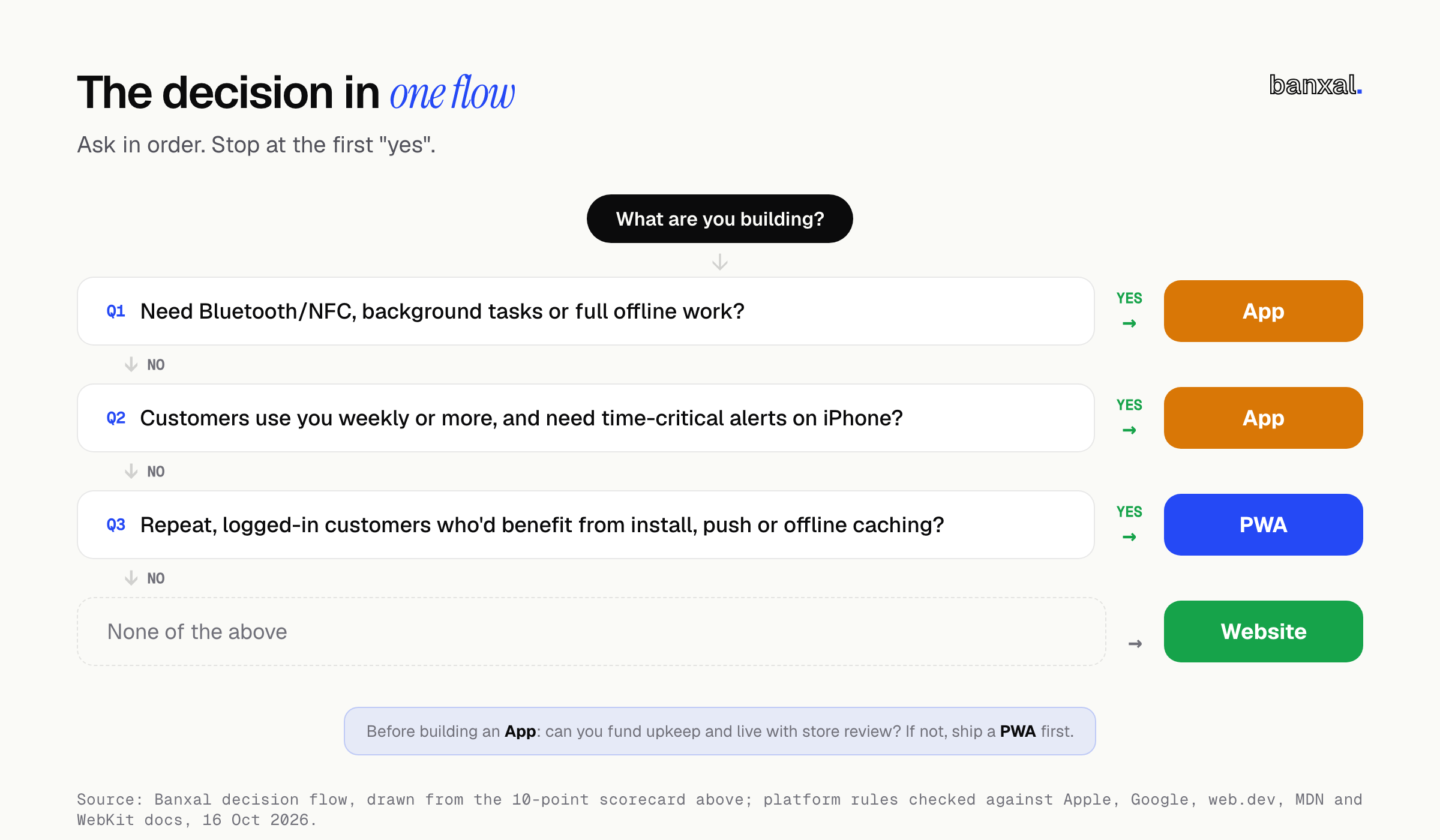
- Do you need Bluetooth, NFC, background tasks or full offline work? App.
- Do customers use you weekly and need time-critical alerts on iPhone? App.
- Do you have repeat, logged-in customers who’d benefit from install, push or offline caching? PWA.
- None of the above? Website.
The order matters: hardware and offline limits are technical walls, while usage frequency is a judgment call.
A worked example (hypothetical)
Illustrative only. This is not a Banxal client and the numbers are made up for the exercise.
“Riverside Yoga” is an independent studio with about 400 members. The owner has been quoted for an iOS and Android app with class booking, a membership card and a waitlist. Here’s how they score:
| Question | Score | Reasoning |
|---|---|---|
| 1. Frequency | 2 | Members come twice a week. |
| 2. Accounts | 2 | Bookings and memberships are the business. |
| 3. Notifications | 1 | “A spot opened on the waitlist” helps, but email and SMS already work. |
| 4. Offline | 0 | Booking needs a connection anyway. |
| 5. Device features | 0 | A QR check-in on the front-desk tablet covers it. |
| 6. Beyond the website | 1 | Booking and a membership card are interactive, but not unique. |
| 7. App store expectation | 0 | New members find the studio on Google Maps. |
| 8. Upkeep budget | 1 | The owner can fund a few hours a month. |
| 9. Release gatekeepers | 1 | Timetable changes are content, not releases, so a day’s review delay is fine. |
| 10. Evidence | 1 | Members book online weekly, but nobody has asked for an app. |
| Total | 9 | PWA |
No override checks fire. The studio’s next step is to make its existing booking site installable, add a “Get waitlist alerts” button that walks iPhone users through Add to Home Screen, and cache the timetable so it loads on patchy signal.
What would change the answer? A feature that needs Bluetooth, such as syncing heart-rate monitors, pushes Q5 to 2 and fires the override. Even then the PWA isn’t wasted: its booking logic and backend carry over to an app.
Mistakes we see in this decision
- Building an app to get “found”. If Q7 scored 0, your customers find you through search and maps, so your website’s SEO matters more than a store listing.
- Wrapping the website in an app shell. It’s a common shortcut into the stores, and exactly what Apple’s minimum-functionality rule (4.2) is written to catch.
- Planning for launch, not year two. Apps need updates when iOS and Android change, a renewed Apple membership and a store review for every fix. That’s why Q8 exists.
- Assuming PWAs can’t do push on iPhone. That stopped being true with iOS 16.4. The real limit is the install step, so design it rather than waiting for a prompt.
- Skipping the scope step. Whatever you build, write down what’s out of scope first. Our MVP spec template starts there.
What it costs, without the made-up ranges
You’ll find plenty of “an app costs $X to $Y” tables online. We won’t add another, because cost depends on scope and your score doesn’t change that. What the score does change is the shape of the cost:
- Website and PWA: one codebase, hosting, no platform fees, no review queue.
- App: Apple’s 99 USD a year and Google’s 25 USD one-off (Apple; Google), store listings to maintain, and release testing on two platforms. If you sell digital goods inside an iOS app, Apple’s Small Business Program rate is 15% for developers under 1 million USD in annual proceeds (Apple). Check the current terms for your region before you build a pricing plan around it.
If you’re tempted to start on a no-code builder, check what you can export first. Our FlutterFlow handoff guide compares export options across mobile builders. And if your “app” is really about automating bookings or reminders, the problem is sometimes solved behind the scenes, with no new screen for customers at all.
FAQ
Can a PWA be listed in the App Store or Google Play? Not by default. A PWA is installed from the browser. Wrapping one in an app shell for the stores turns it into an app with an app’s review process, and Apple may reject it under guideline 4.2 if it adds little beyond your website (Apple).
Do PWAs send push notifications on iPhone? Yes, from iOS 16.4, once the user has added the web app to their Home Screen and tapped to allow notifications (WebKit).
Do PWAs still work on iPhones in the EU? Yes. Apple reversed its plan to remove Home Screen web apps in the EU in March 2024 (9to5Mac), and we found no later change as of 16 October 2026.
If I start with a PWA, do I throw it away when I need an app? Usually not. Your backend, database and business logic carry over. The screens get rebuilt for the app.
Next step
Score yourself honestly, then look at which questions you scored 2 on, because they tell you which features matter most. Banxal builds websites, web apps and cross-platform mobile apps. If your score sits on a band boundary, or an override fired and you want a second opinion before committing, get in touch and send us your ten answers.
What did you score, and did it match what you were planning to build? Tell us in the comments.