Most founders write their first spec the same way: a long list of everything the product will do. A developer reads it, quotes for all of it, and three weeks in someone asks, “Can we also add…?”
This MVP spec template for non-technical founders reverses the order. You write down what you’re not building before you describe what you are. It takes five minutes, fits on one page, and gives your developer the one thing most specs leave out: a clear edge.
TL;DR
- Write the out-of-scope list first. For each cut feature, note the manual workaround and the point at which you’ll reconsider it. That’s what keeps cut features from creeping back in.
- Scope in one core workflow and name its screens. If a developer can’t count the screens, they can’t estimate the work.
- Send one page, not twenty. Include the template below, a few sketches and your constraints. A good developer’s first questions will be about the edges, not the features.
Why specs get scope creep
Specs get scope creep because the out-of-scope decision gets made too late, after the feature list is already written — and the problem is common well beyond first-time founders. In PMI’s 2018 Pulse of the Profession survey, 52% of projects completed in the previous 12 months had scope creep or uncontrolled changes to scope, up from 43% five years earlier (PMI, 2018). The same report names “erroneous requirements gathering” as one of the causes behind uncontrolled scope.
For an MVP, every added feature delays the day real users tell you whether the idea works. In CB Insights’ 2026 analysis of startup shutdowns, poor product-market fit was cited in 43% of cases where a failure reason could be identified (CB Insights).
Most MVP spec templates do have an “out of scope” section. The trouble is that it comes near the end, after the features. By then you’ve already decided what’s in, and the section just collects leftovers.
Start with what you’re not building
Write your out-of-scope list before you write your feature list — deciding what to cut first is what keeps the cuts from being reversed later. Starting with exclusions isn’t a new idea: Basecamp’s Shape Up method lists “no-gos” as one of the five parts of every project pitch: “functionality or use cases we intentionally aren’t covering” (Shape Up, ch. 6). The MoSCoW prioritisation method has a “Won’t Have this time” category for the same reason. Writing those items down helps “avoid them being informally reintroduced at a later date” (Agile Business Consortium).
“Informally reintroduced” is how MVP scope creep usually happens. Nobody decides to double the scope. Someone says on a call that self-rescheduling would be nice, and since nobody wrote down why it was cut, nobody can say no.
The fix is to give every cut feature three things:
- The feature, named specifically (“customer self-rescheduling”, not “account features”).
- The manual workaround you’ll use instead (“customer texts us; we move it by hand”).
- The revisit trigger: the evidence that would put it back on the table (“more than 10 reschedule texts a week”).
A cut with a workaround and a trigger reads as a decision. A cut without them reads as an oversight, and people will try to fix oversights.
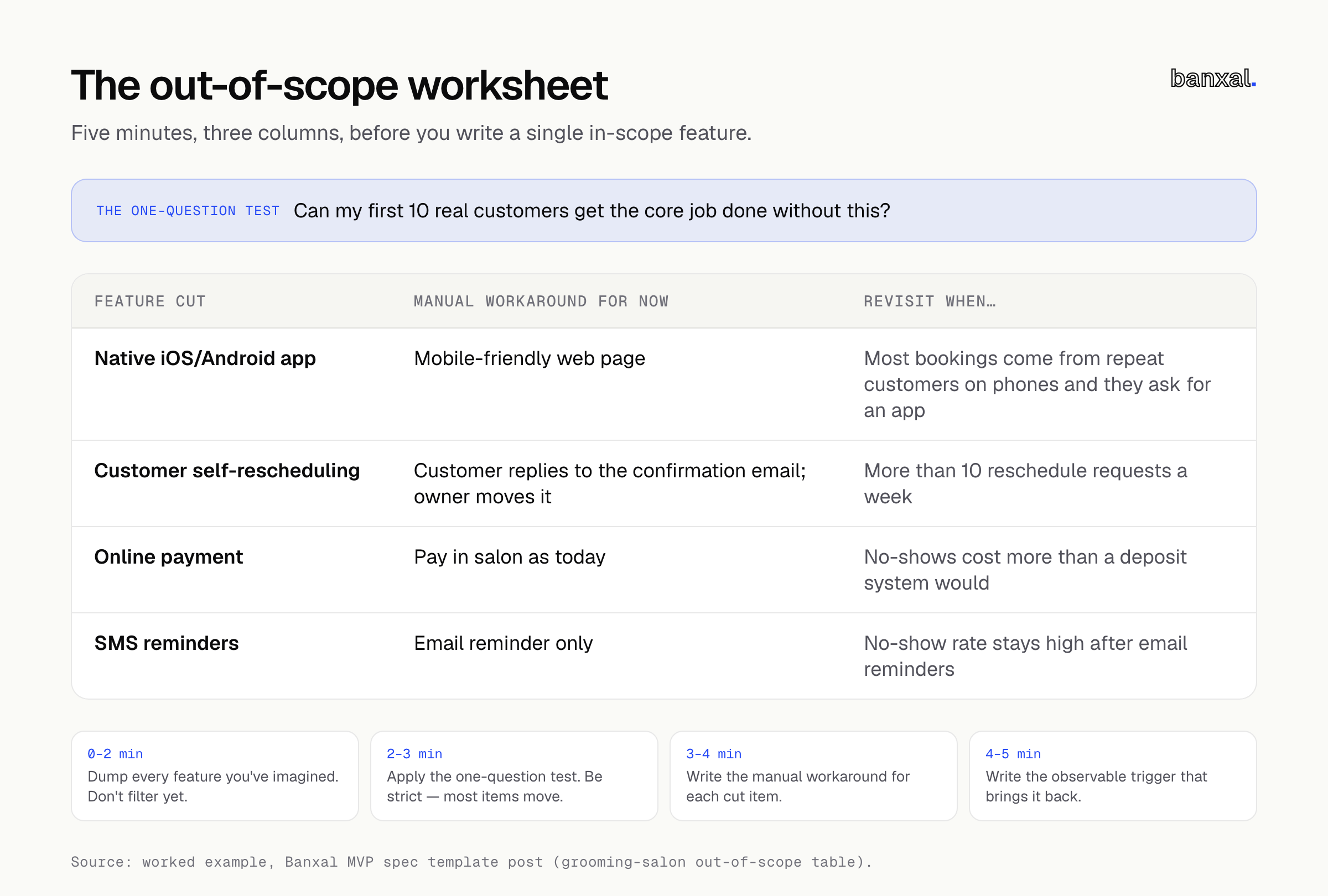
The 5-minute out-of-scope exercise
Set a timer and grab paper or a blank doc.
Minutes 0–2: Dump everything. List every feature you’ve imagined, including the ones you assume are obvious: login with Google, an admin dashboard, notifications, a mobile app, reports, payments, reviews, multiple languages. Don’t filter yet.
Minutes 2–3: Apply the one-question test. For each item, ask: Can my first 10 real customers get the core job done without this? If yes, move it to the out-of-scope column. Be strict. Most items will move.
Minutes 3–4: Write the workaround. For each cut item, write how you’ll handle it by hand for now: email, a spreadsheet, a phone call, a Stripe payment link, or you personally. If you can’t think of any workaround, that’s a signal the item may belong in scope.
Minutes 4–5: Write the trigger. For each cut item, write what would make you reconsider it. Make it observable (“three customers ask for it unprompted”), not a feeling (“when we’re bigger”).
Two things never go on the cut list: basic security (proper login, protected data, backups) and anything the law requires where you operate. Those aren’t features. They’re the cost of having real users.
Now scope what’s in (one core workflow, named screens)
Once your out-of-scope list is set, the in-scope section only needs two things: one core workflow written as numbered steps, and a list of named screens. With the edges set, the in-scope section can stay short.
One core workflow, written as numbered steps. This is the one journey a user takes to get the value you’re promising. Write it from the user’s point of view, one action per line. If you have two workflows, pick the one that tests your riskiest assumption and move the other to out-of-scope.
A list of named screens. “Booking page”, “Confirmation email”, “Owner’s day view”. Developers estimate in screens, data and integrations, so a named list turns “a booking app” into something they can count. If a step in your workflow doesn’t map to a screen, an email or a manual action, you’ve found a gap.
The Agile Business Consortium recommends keeping “Must Have” work to no more than 60% of total effort, leaving room for surprises (Agile Business Consortium). In practice: if your must-haves feel like the whole budget, keep cutting.
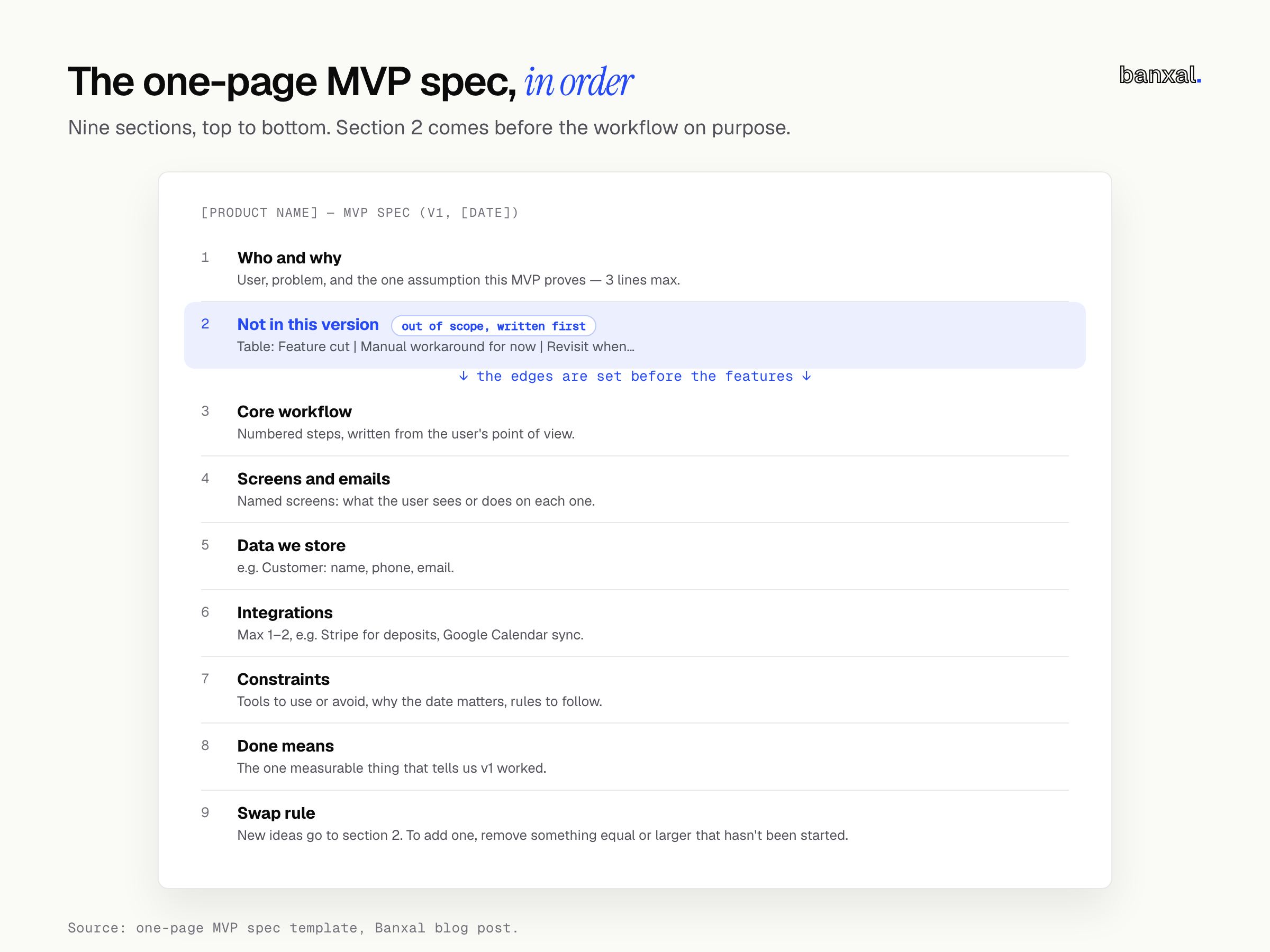
The one-page MVP spec template for non-technical founders (copy this)
Call it a spec, an MVP scope document or a requirements template; the job is the same. Fill it in top to bottom. Section 2 comes before section 4 on purpose.
# [Product name] — MVP spec (v1, [date])

## 1. Who and why (3 lines max)
- User: [one specific type of person or business]
- Problem: [what they do today, and why it's painful]
- This MVP proves: [the one assumption we're testing]

## 2. Not in this version
| Feature cut | Manual workaround for now | Revisit when… |
|---|---|---|
| | | |

## 3. Core workflow (numbered, user's point of view)
1.
2.
3.

## 4. Screens and emails
- [Screen name]: [what the user sees or does here]

## 5. Data we store
- [e.g. Customer: name, phone, email]

## 6. Integrations (max 1–2)
- [e.g. Stripe for deposits, Google Calendar sync]

## 7. Constraints
- Must use / must avoid: [tools, accounts you already have]
- Why the date matters: [launch event, funding, season, or "no hard date"]
- Rules we must follow: [privacy, industry rules, where users are]

## 8. Done means
- [The one measurable thing that tells us v1 worked]

## 9. Swap rule
New ideas during the build go to section 2. To add one, we remove
something of equal or larger size that hasn't been started.
The swap rule comes from Jesse Fewell, quoted in the same PMI report: “You can replace any not-started deliverable with anything of equal or lesser cost” (PMI, 2018). Writing it into the spec means you agree on the rule before you’re attached to any new idea.
Worked example: a booking app for a grooming salon
This is a hypothetical example to show the template in use. It isn’t a client project.
Imagine a two-groomer dog salon where customers book by phone and Instagram DM, and the owner misses calls while grooming.
1. Who and why
- User: existing salon customers booking a groom
- Problem: booking means calling during working hours or waiting for a DM reply
- This MVP proves: customers will book online if it’s quick, which frees up the owner’s time
2. Not in this version
| Feature cut | Manual workaround for now | Revisit when… |
|---|---|---|
| Native iOS/Android app | Mobile-friendly web page | Most bookings come from repeat customers on phones and they ask for an app |
| Customer self-rescheduling | Customer replies to the confirmation email; owner moves it | More than 10 reschedule requests a week |
| Online payment | Pay in salon as today | No-shows cost more than a deposit system would |
| SMS reminders | Email reminder only | No-show rate stays high after email reminders |
| Customer accounts and logins | Book with name, phone, email | Repeat customers complain about re-entering details |
| Reports and analytics | Owner exports bookings to a spreadsheet monthly | Owner needs this more than once a month |
| Second location | Not needed | A second location is signed |
3. Core workflow
- Customer opens the booking link from Instagram or Google.
- Picks a service (bath, full groom, nail trim) and dog size.
- Sees available slots for the next 14 days and picks one.
- Enters name, phone, email, dog’s name and breed.
- Gets a confirmation email, and a reminder 24 hours before.
- Owner sees the booking in a day view and can cancel or block time.
4. Screens and emails: service picker, slot picker, details form, confirmation page, confirmation email, reminder email, owner login, owner day view, block-time form. That’s nine items a developer can estimate.
5–8. Data: customer, dog, booking, service, groomer. Integrations: an email-sending service. Constraint: the owner already uses Google Workspace. Done means: 30% of bookings made online within the first two months.
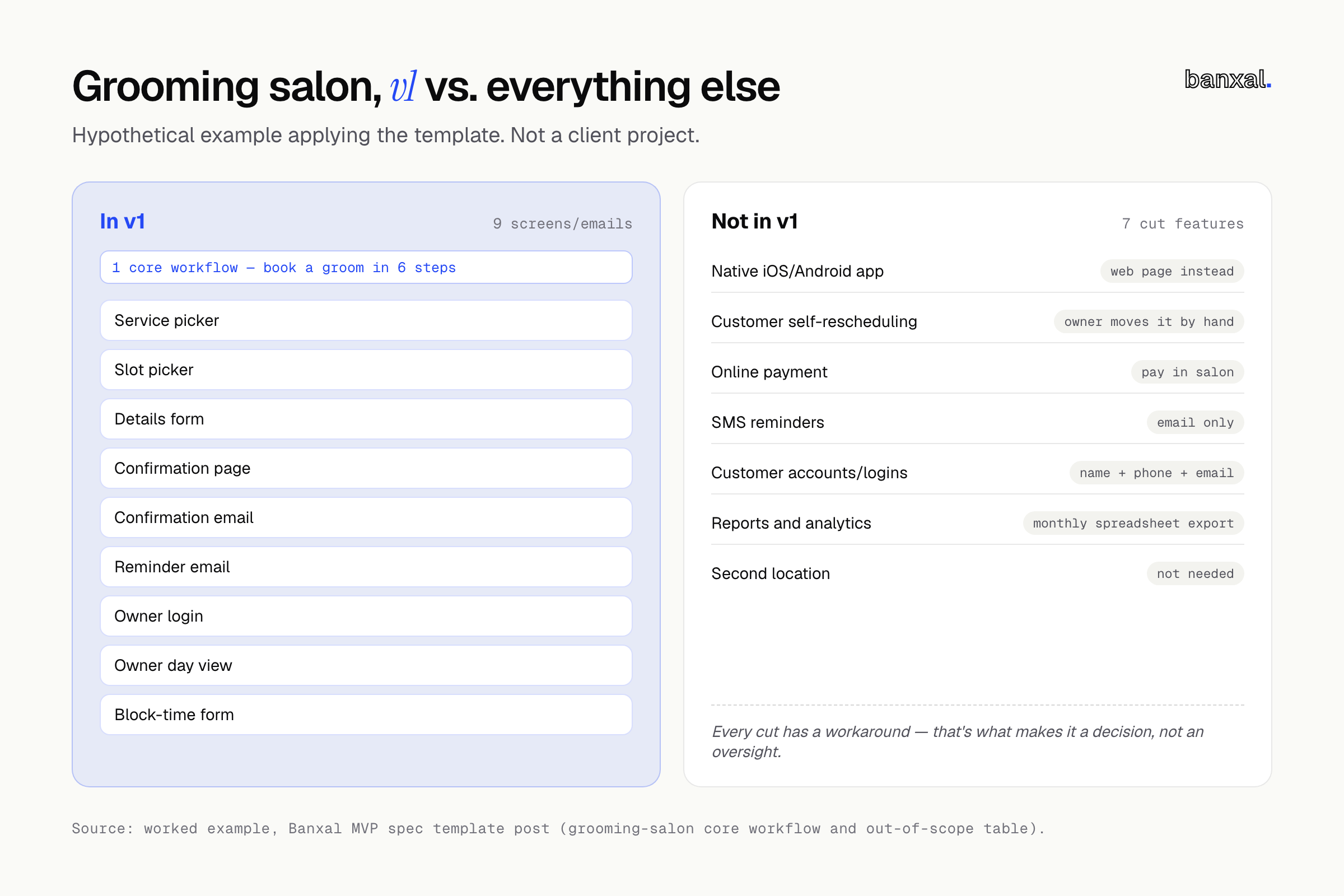
The out-of-scope table, not the feature list, is what keeps this build small. “No online payment” and “no accounts” remove whole chunks of work, and the workarounds show they were decisions.
What to send a developer (and what a good first call sounds like)
Send four things:
- The one-page spec above.
- Sketches. Phone photos of paper drawings are fine. If you’ve built a clickable prototype in Lovable or Bolt, send that too. Our guide to handing off a Lovable or Bolt app to a developer covers what to prepare.
- Two or three reference products. “Booking like Calendly, but showing services first.”
- Accounts you already have: domain, email provider, payment account, brand files.
On the first call, listen to the questions. A good developer asks about the edges: “What if two people book the same slot?” “Do groomers have different hours on different days?” They may push back on a cut, suggest cutting more, and say which parts they’re unsure about. Be wary of anyone who agrees to everything and quotes without asking a question. That estimate is a guess.
Already have a half-built product? Read fix or rebuild a vibe-coded app before writing the spec.
Want a second pair of eyes on your spec?
Banxal builds web applications and MVPs for founders. If you’ve filled in the template, send it to us. We’ll read it and tell you what’s missing, what’s unclear, and what we’d move to “not in this version”.
FAQ
How long should an MVP spec be?
One page for the parts above, plus sketches. If it runs past two pages, you’re probably describing more than one workflow, or writing implementation details your developer should decide. Length doesn’t make a spec clear. Clear edges do.
What if I don’t know what to cut?
Run the one-question test on every feature: can your first 10 customers get the core job done without it? If you still can’t decide, ask what the manual workaround would cost you each week. If it’s an hour of your time, cut it. If it means losing customers, keep it.
Do I need wireframes before talking to a developer?
No. Named screens and rough sketches are enough for a useful first conversation and a sensible estimate. Detailed wireframes help later, but making them before scope is settled often means designing screens you’ll cut.
What’s the hardest feature you’ve had to move to “not in this version”? Tell us in the comments. We’d especially like to hear from anyone whose revisit trigger actually fired.