Your FlutterFlow app is on TestFlight, maybe live in the stores, and real people use it. You’ve found a developer to take it further, and their first message is: “Can you share the code and give me access?”
On mobile, that one request covers six or seven things: the FlutterFlow project, a GitHub repo, a Firebase or Supabase backend, Apple and Google developer accounts, push-notification keys and every third-party API the app calls. Hand off a FlutterFlow app to a developer without mapping those, and you’ll either pay them to dig through your setup or give away something you can’t get back.
This guide covers what you can export, what to share instead of transfer, and what to write down first.
TL;DR
- FlutterFlow gives you real code. Most mobile no-code tools don’t. Code download starts on the Basic plan and GitHub push on Growth. Adalo and Glide have no code export, and Bubble apps only run on Bubble.
- Share access, keep ownership. Invite the developer to FlutterFlow, Firebase, GitHub, App Store Connect and Play Console under their own login. A FlutterFlow ownership transfer “can not be undone.”
- Check secrets and security rules before anyone forks the code. Private keys can end up in FlutterFlow’s generated cloud function files, and one of its rule options is “Everyone”.
Why mobile no-code handoffs are trickier than web ones
A web handoff is mostly code, database and domain. Mobile adds three complications.
The stores are separate accounts. Your listing, reviews and release history live in Apple’s and Google’s consoles, not in FlutterFlow.
Some keys only download once. For Apple’s push notification key (the .p8 file), “the key is not saved in your developer account and you won’t be able to download it again” (Apple Developer). If a past freelancer kept the only copy, you’ll have to create a new key.
Old versions stay installed. Web users get your latest version on their next visit, but mobile users keep whatever build they installed until they update — so a careless database change can break the version people already have, even when the new build works fine.
Coming from a web builder? Our Lovable and Bolt handoff guide covers that side.
Export reality: what you can actually take with you
Before hiring, work out what you’re handing over: either code a developer can open, or a project that only exists inside the builder. Here’s what each builder’s docs said when we checked on 12 October 2026.
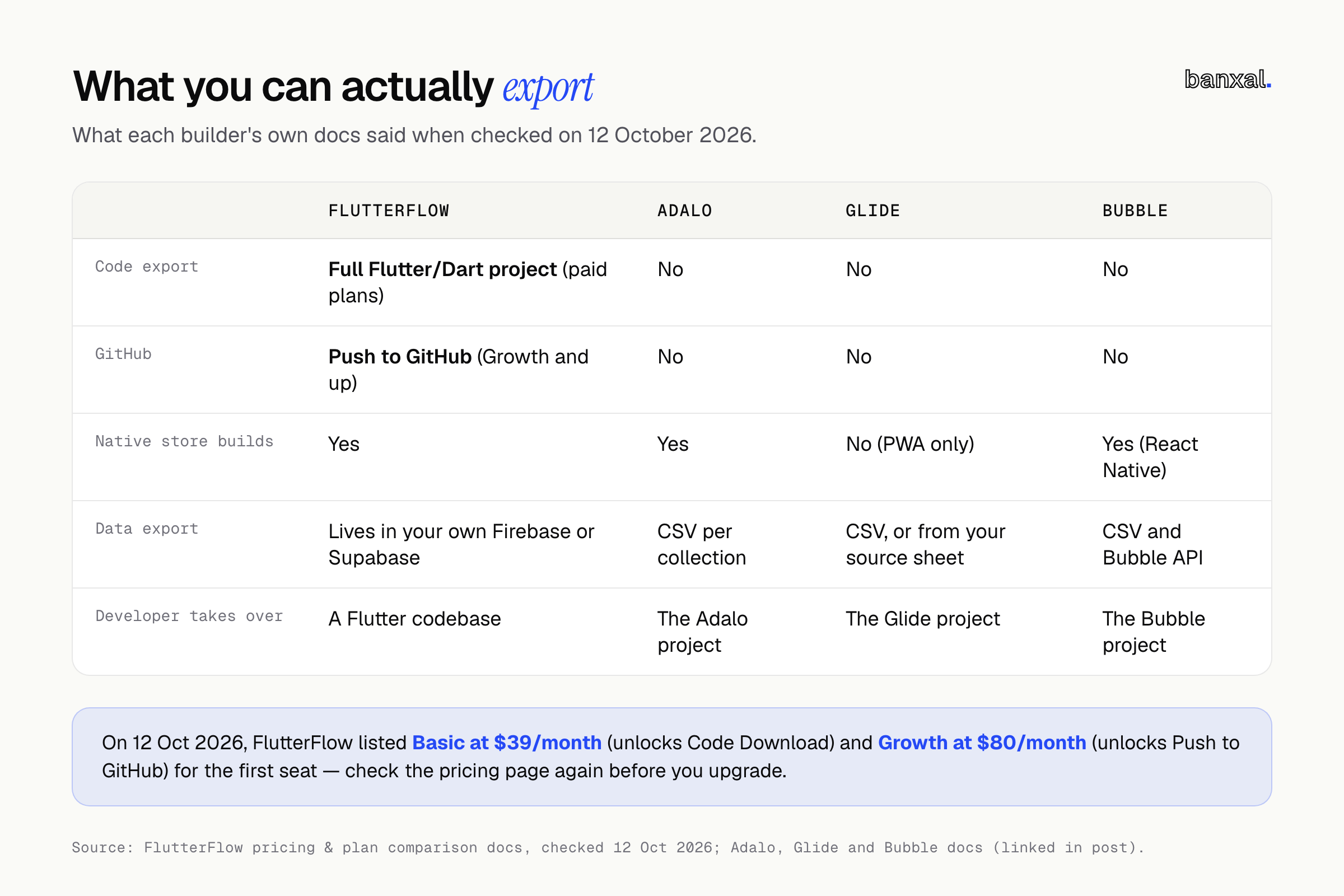
- FlutterFlow. Download Code gives you “the entire codebase of the app generated by FlutterFlow” (toolbar docs), and that code runs “as a normal Flutter app without requiring FlutterFlow” (FlutterFlow projects). Code Download is on Basic and up, and exporting FlutterFlow to GitHub (Push to GitHub) needs Growth and up (plan comparison). On 12 October 2026, Basic was listed at $39/month and Growth at $80/month for the first seat (pricing). Check the page again before you upgrade.
- Adalo. Adalo staff wrote in August 2025 that “it is not possible to download the source code of the app at the moment” (Adalo forum) — an Adalo app’s no-export lock-in. You can still export data as CSV, one collection at a time; details from the “many” side of a relationship are left out (Adalo help).
- Glide. Glide apps “are Progressive Web Apps (PWAs), and publishing directly to the App Store or Google Play is not supported” (Glide help). On Glide’s community forum, the answer to “can I export my source code?” is “there is no source code for your apps” (Glide community).
- Bubble. Bubble is no longer web-only. It now publishes native apps built on React Native (Bubble native mobile). The code still stays with Bubble, though: “there’s no way of exporting your application as code,” and leaving means you “have to rebuild the application logic” (Bubble ownership).
On Adalo, Glide or Bubble, a developer either keeps building inside the tool or rebuilds from scratch. FlutterFlow adds a third option: export the code and carry on from there.
The 10-minute export self-check
Do this before your first call with a developer. You don’t need to be technical.
- FlutterFlow Developer Menu: can you click Download Code? If it’s locked, you’re on the free plan.
- Download the ZIP and store it outside FlutterFlow as a dated snapshot.
- Settings > Integrations > GitHub: is a repo connected, and whose account or organisation owns it?
- Log into Firebase or Supabase yourself. If you can’t, find out who can.
- Log into App Store Connect and Play Console. Confirm that you, not a former freelancer, are Apple’s Account Holder and Google’s account owner.
- Find the
.p8push key. Do you have it, or know who does? - List your custom code: every Custom Action, Widget and Function.
If steps 4 to 6 end in “I don’t know”, fix that before hiring. Those accounts are the hardest to recover.
How to hand off a FlutterFlow app to a developer: share access, don’t transfer ownership
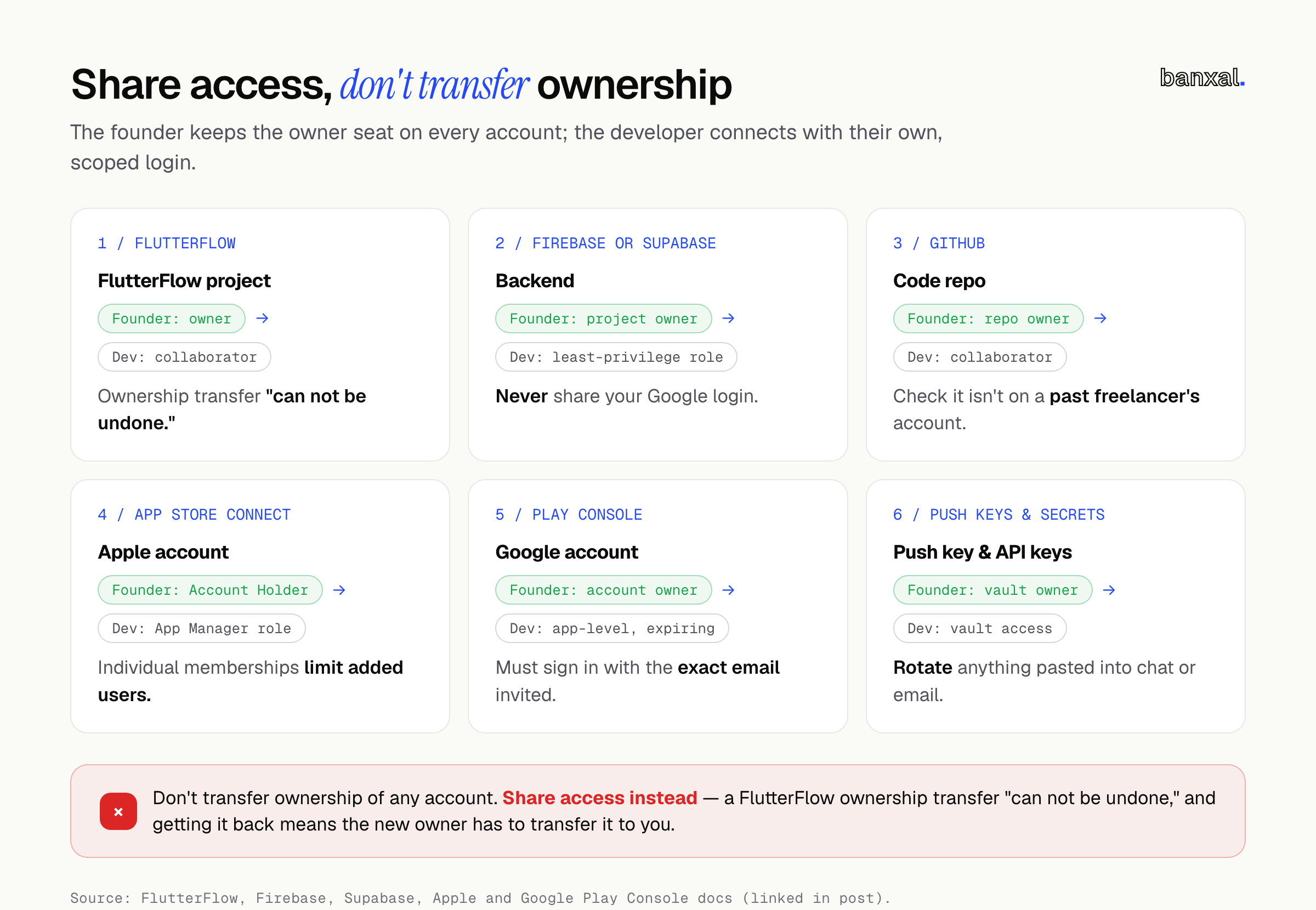
The developer gets their own login with scoped access, and you keep the owner seat. When the work ends, you remove one person and nothing else breaks.
| Account | Give the developer | Watch out for |
|---|---|---|
| FlutterFlow | Editor access as a collaborator | Ownership transfer “can not be undone”. To get it back, the new owner has to transfer it to you (collaboration docs) |
| Firebase | A role under Users and permissions, using “least privilege” (Firebase IAM) | FlutterFlow is already an Editor on your project (FlutterFlow + Firebase). Never share your Google login |
| Supabase | Developer role, which can’t change project settings or API keys (Supabase access control) | Invites expire after 24 hours |
| GitHub | Collaborator on a repo you own | Check the repo isn’t on a past freelancer’s account |
| App Store Connect | Developer or App Manager role, limited to this app (Apple) | Individual memberships have a catch (below) |
| Play Console | App-level permissions with an access expiry date (Play Console Help) | They must sign in with the exact email you invited |
| Push keys, Stripe, AI APIs | Shared through a password manager vault | Rotate anything pasted into chat or email |
Apple individual memberships. If you enrolled as an individual, Apple says users you add “only access App Store Connect” and aren’t part of your team (Apple). Managing keys needs the Account Holder or Admin role (Apple keys), so expect to do those steps yourself.
Android’s two keys. With Play App Signing, Google holds the app signing key and you hold the upload key. If the upload key is lost, you can request a reset (Play App Signing) — but know where it lives.
Document what you built
The developer can read your code, but not the reasoning behind it. This FlutterFlow app takeover checklist covers what to write down before they start.
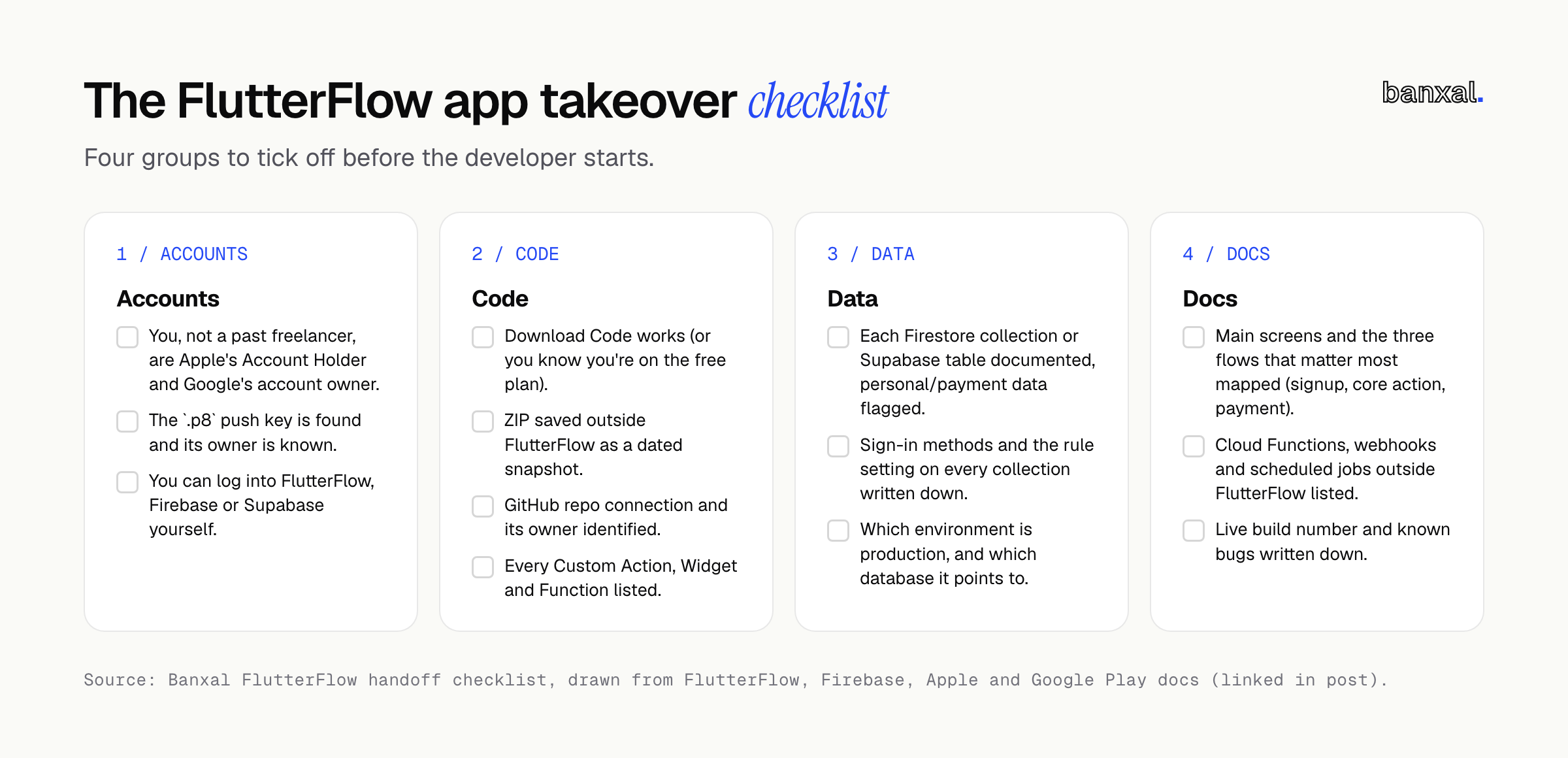
- Data model: each Firestore collection or Supabase table, what it holds, and which hold personal or payment data.
- Custom code: each Custom Action, Widget and Function, what it does, and any packages added. In the export, these live in
lib/custom_code/(project structure). - Navigation: the main screens and the three flows that matter most (signup, core action, payment).
- Auth and rules: your sign-in methods and the rule setting on every collection.
- Environments: if you use Development Environments, which one is production and which database each points to (dev environments).
- Outside FlutterFlow: Cloud Functions, webhooks, scheduled jobs and anything else configured by hand.
- Live build number and known bugs.
FlutterFlow-specific traps
FlutterFlow’s visual builder hides a few gotchas that surface only once code is exported or pushed to GitHub. Check each before a developer forks the project.
Secrets in generated cloud functions. “Make Private” sends an API call through Firebase Cloud Functions, so your tokens stay out of the app (API calls). But FlutterFlow warns that a private value used this way “may appear in the cloud function’s code.” It also says you “must review and manage these cloud function files” before exporting or pushing to GitHub (dev environments). Then check your Custom Actions for hardcoded keys; custom Dart code ships inside the app.
Unreviewed Firestore rules. Rule options run from “Everyone” (signed in or not) to “No One”. FlutterFlow warns that defaults can be too open: a new collection everyone can read when only its creator should (Firestore rules). Your screens only show people their own data; the database still answers anyone who asks directly. Our post on backend validation explains why that gap is now easier for attackers to find.
The flutterflow branch gets overwritten. FlutterFlow “always pushes changes to a branch named flutterflow,” and direct edits “will be overwritten by the next push” (GitHub docs). The documented pattern: the developer works on their own branch and merges FlutterFlow’s updates in through pull requests. Agree on this on day one.
Decide where the visual editor stops. Code a developer edits in Git doesn’t flow back into FlutterFlow’s canvas. The VS Code extension syncs custom code files in both directions, but only on Growth and up (VS Code extension). Decide whether you’ll keep building visually or hand the codebase over fully.
Generated code may need restructuring. Every page gets its own widget and model file, and utilities sit in lib/flutter_flow/ (project structure). The code works, but a developer may want to reorganise it before adding large features.
A worked example (hypothetical)
Illustrative only, not a Banxal client.
A founder runs a FlutterFlow booking app on the Basic plan, using Firebase, live in both stores. They’ve hired a Flutter developer to add payments and a tutor dashboard.
- Self-check. Download Code works, but there’s no GitHub connection (that needs Growth). The Apple membership is individual, and a freelancer created the
.p8key last year — nobody can find it now. - Code. The founder sends the ZIP; the developer sets up the repo in a GitHub organisation the founder owns.
- Access. The developer gets a scoped Firebase role, an App Manager role in App Store Connect limited to this app, and a 90-day Play Console invite.
- Keys. The founder revokes the lost key, creates a new one, and stores it in a shared vault.
- Rules. The developer’s first job: lock the bookings collection so tutors only see their own sessions.
It takes the founder an afternoon, and the developer starts on features right away.
When to rebuild instead
A handoff only makes sense if the foundations are worth keeping. On Adalo or Glide, getting code you own means a rebuild: your data comes with you, but the screens and logic don’t. On FlutterFlow, the deciding question is the data model. If your collections still match how the business works, harden what you have; if they don’t, every new feature will fight it. Our fix-or-rebuild self-test takes 30 minutes.
Choosing who takes over
Look for someone who reads Dart comfortably, has shipped Flutter apps through both stores, and has an opinion on FlutterFlow’s generated code. Good candidates ask to be invited, not for your passwords, and bring up the flutterflow branch before you do. Our guide to vetting a developer has interview questions and red-flag answers that carry over to mobile.
FAQ
Can I export a FlutterFlow app and keep editing it in FlutterFlow?
Yes. FlutterFlow pushes to its flutterflow branch, and you merge that into your own branch. Changes the developer makes to generated code don’t come back into the editor (GitHub docs).
Do I need the Growth plan to hand off? No. Code Download is available on Basic, so you can send a ZIP. Push to GitHub and real-time collaboration need Growth or higher (plan comparison).
Should I give the developer my Apple or Google login? No. Both stores let you add users with limited roles, and Google lets you set an expiry date. Shared logins mean you can’t remove one person later.
I built on Adalo. Can I get the code? Not today. Adalo staff confirmed in August 2025 that it isn’t possible (Adalo forum). Export your collections as CSV and plan a move to code as a rebuild.
Next step
Most of a mobile handoff is admin, but some of it can’t be undone. Banxal builds cross-platform iOS and Android apps, and our product maintenance and growth work covers apps other people started too. Want a second opinion on your export, access and security rules before you commit to a developer? Get in touch and tell us what you’ve built.
What worries you most about handing over a no-code app: the code, the store accounts or the data? Let us know in the comments.