Your checkout page has a discount field: type a code, the price drops 10%; type a wrong one, the button greys out. You tested it and it works — what you probably didn’t test is the backend validation behind it.
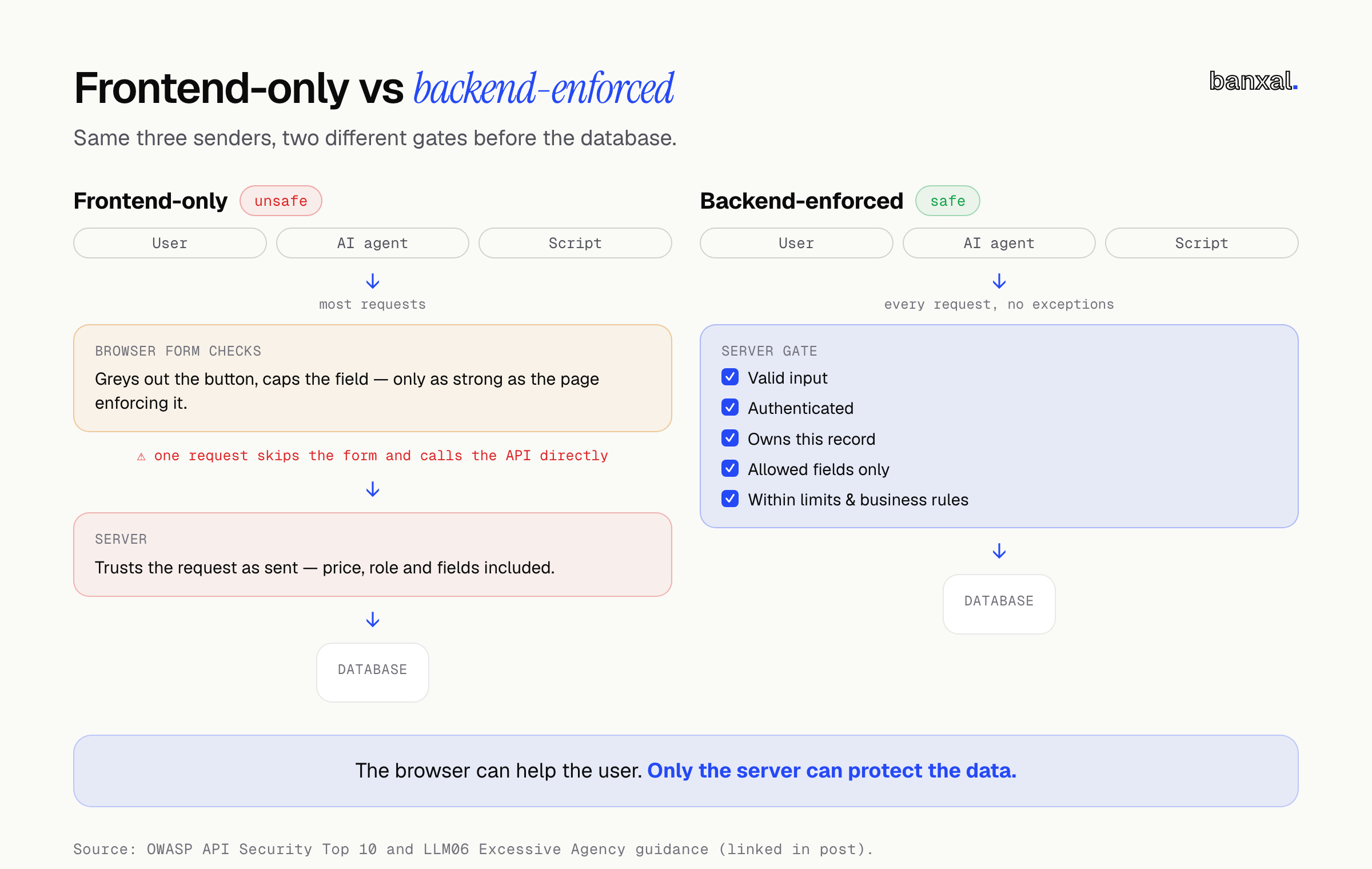
Now look at what the browser actually sends on “Pay”: the cart, the code, and in a surprising number of apps, a total the page worked out for itself. If the server accepts that number as-is, the only thing stopping a 100% discount is JavaScript running in a browser the customer controls.
That’s a hypothetical, not a client. But OWASP uses the same pattern in its own examples: a booking API that let hosts change a total_stay_price field they should never have been able to touch (OWASP API3).
Gaps like this used to stay hidden because finding them took a patient human with developer tools open — not anymore. Backend validation, enforcing every rule on the server and not just the page, is now the minimum for any live app, because AI has made hunting for these gaps cheap, fast and tireless. This post covers why, the gaps AI finds first, a checklist, and a 15-minute self-check for you and your developer.
TL;DR
- Your frontend is a suggestion. Anyone can skip a browser-only rule by sending requests directly, and AI tools now do this at machine speed.
- It’s not only attackers. Browser agents, AI assistants and MCP tools use your app in ways your UI never planned for — treat every request as if it didn’t come from your page.
- Fix it on the server. Validate every input, check ownership on every record, accept only expected fields, recalculate prices and states yourself, rate-limit, and keep error messages boring.
Why AI changes the economics of finding loopholes
Probing an app was always possible — what’s changed is the cost, and the evidence is piling up:
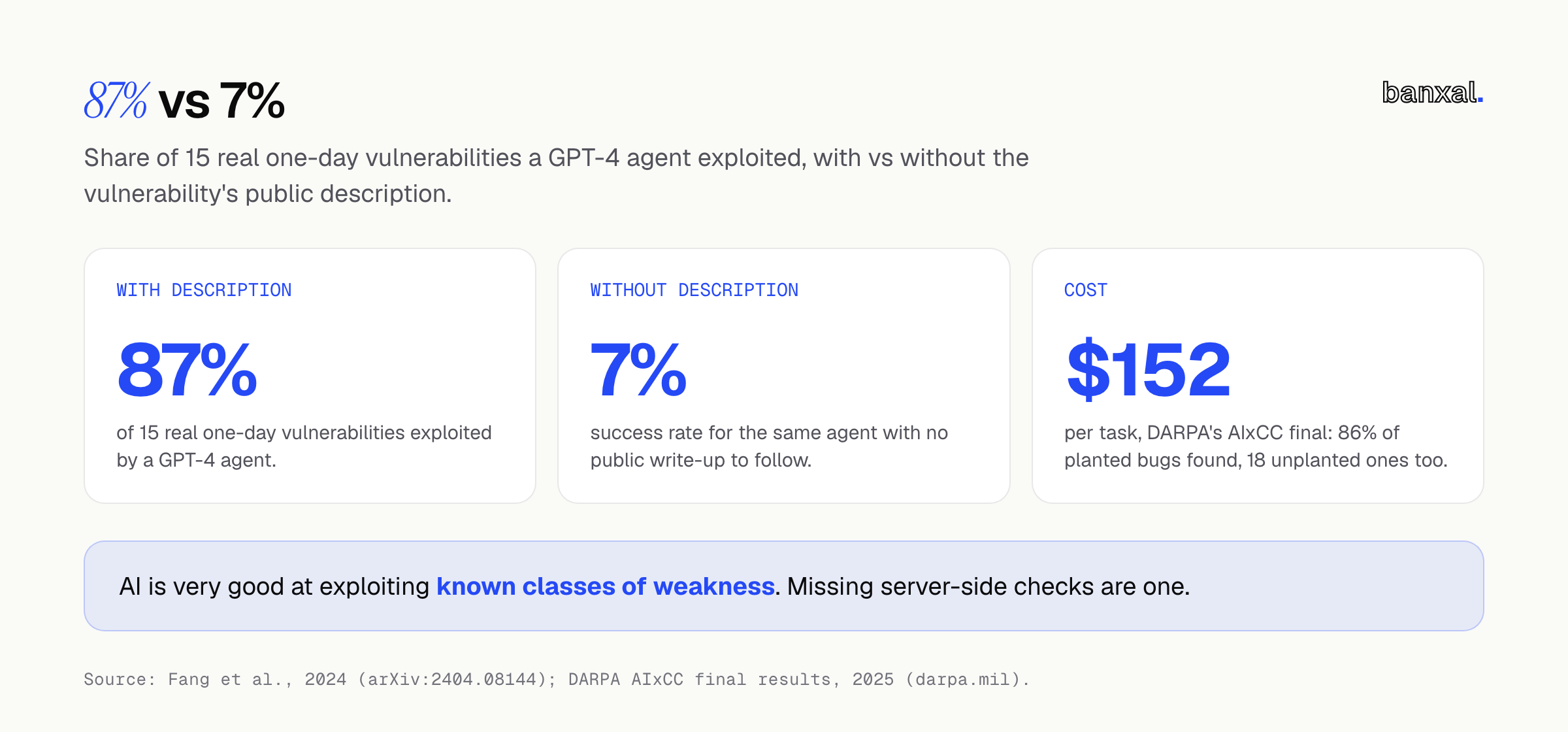
- Exploiting known weaknesses. In a 2024 University of Illinois study, a GPT-4 agent exploited 87% of 15 real-world “one-day” vulnerabilities when given the public description — every other model and the open-source scanners tested managed 0% (Fang et al., 2024). Without the description, success fell to 7%: agents are far better at exploiting known classes of weakness than at finding new ones.
- Finding what fuzzing missed. Google’s Big Sleep agent found a SQLite bug that “remained undiscovered after 150 CPU-hours of fuzzing” — Google calls it “the first public example of an AI agent finding a previously unknown exploitable memory-safety issue in widely used real-world software” (Project Zero).
- Doing it at scale, cheaply. In DARPA’s AI Cyber Challenge final, the teams’ systems analysed over 54 million lines of code, found 86% of the planted vulnerabilities, turned up 18 real ones nobody had planted, and cost “about $152” per task (DARPA).
- Attackers are already using it. Anthropic reported a campaign where a threat actor used AI for “80-90% of the campaign”, making “thousands of requests, often multiple per second”, though the AI “occasionally hallucinated credentials” (Anthropic) — it isn’t magic, but it doesn’t get tired.
What does that mean for a normal web app? The gaps in your app aren’t famous CVEs — they’re the same documented API security weakness classes OWASP has tracked for years. An AI-assisted tester reads your JavaScript bundle for every route your frontend knows, checks every field in every API response your UI hides, and tries the combinations a human would get bored of: every ID, every optional parameter, every out-of-range value. None of that takes cleverness — just patience, which now costs almost nothing.
Even friendly AI uses your backend differently
There’s a second shift that gets less attention in most server-side validation advice: AI acting for your real users.
Computer-use agents can “take screenshots, control the mouse, and type on the keyboard” (Anthropic docs), and the Model Context Protocol lets assistants like Claude or ChatGPT connect to tools and “perform tasks” (MCP). An honest customer’s assistant might skip a step, retry a payment, enter a value your dropdown would never offer, or call your API through an integration someone else built — no harm meant, but it still breaks the “form only allows 1 to 10” assumption.
OWASP’s own advice for protecting sensitive business flows includes “denying service to unexpected client devices (e.g headless browsers)” (OWASP API6). That helps, but as agents become an ordinary way to use the web, blocking anything that isn’t “a human in Chrome” turns away more real traffic. The defence that lasts is making every request safe on its own merits — valid, authorised and within limits, whoever or whatever sent it. The same goes for your own AI features: OWASP’s guidance for LLM apps is blunt — “Implement authorization in downstream systems rather than relying on an LLM to decide if an action is allowed or not” (OWASP LLM06).
What AI will poke at first: 8 common gaps
These are classes of weakness, not attack recipes. Each comes with the fix.
1. Missing ownership checks (BOLA / IDOR)
Your invoice page loads /api/invoices/1042. What happens if a logged-in user asks for 1043? OWASP ranks this #1 in its API Top 10, calling it “extremely common in API-based applications” with widespread prevalence (OWASP API1).
Fix: every function loading a record by a client-supplied ID must check the current user can access that record.
2. Hidden fields the server trusts (mass assignment)
Your profile form sends name and email, but the user record also has role, plan or isAdmin. If the server copies the whole request body into the record, those extra fields go through too — OWASP’s cheat sheet uses exactly this isAdmin example (OWASP).
Fix: allowlist the fields each endpoint accepts — denylisting fails when next month’s new column isn’t on the list.
3. Responses that say too much
The UI shows a user’s first name, but the API sends back the whole user object. OWASP’s own example: a dating app’s report feature that exposed a user’s full name and recent location (OWASP API3).
Fix: return only the minimum each screen needs — OWASP advises avoiding generic serialisers such as to_json().
4. Prices, totals and quantities worked out in the browser
The discount example above. Watch too for negative quantities, zero-priced add-ons and overused discount codes. Fix: the server calculates every amount itself, and checks discount codes and their usage limits.
5. Skipped steps and impossible state changes
An order jumps from pending straight to shipped, sign-up step 3 arrives without step 2, or a booking ends before it starts. OWASP calls this semantic validation — checking “whether the value makes sense for the operation”, not just its format (OWASP Input Validation).
Fix: define the allowed transitions on the server, and reject everything else.
6. Inputs outside what the form allows
Your form caps a message at 500 characters, but the API accepts 5 MB. A pageSize of 100,000 returns your whole customer table. OWASP’s advice: “define and enforce a maximum size of data on all incoming parameters and payloads” (OWASP API4).
Fix: check type, length, range and format for every field against an allowlist.
7. No limits on expensive or sensitive actions
Sign-up, one-time codes, password resets, booking slots, and AI features billed per call. OWASP’s examples: buying up all stock to resell, or reserving every available slot (OWASP API6). Fix: rate-limit each user and action, and “configure spending limits for all service providers/API integrations” or at least set billing alerts (OWASP API4).
8. Forgotten endpoints, weak admin checks and chatty errors
Old /v1 routes, debug endpoints, and admin routes that check login but not role. The OWASP Top 10 lists both broken function-level authorization and improper inventory management, noting that APIs “tend to expose more endpoints than traditional web applications” (OWASP API Top 10). Detailed error messages tell a prober exactly what to try next.
Fix: keep a list of every live endpoint, delete the ones you don’t use, check roles on every admin action, and return generic errors while logging the details on the server.
The backend validation checklist
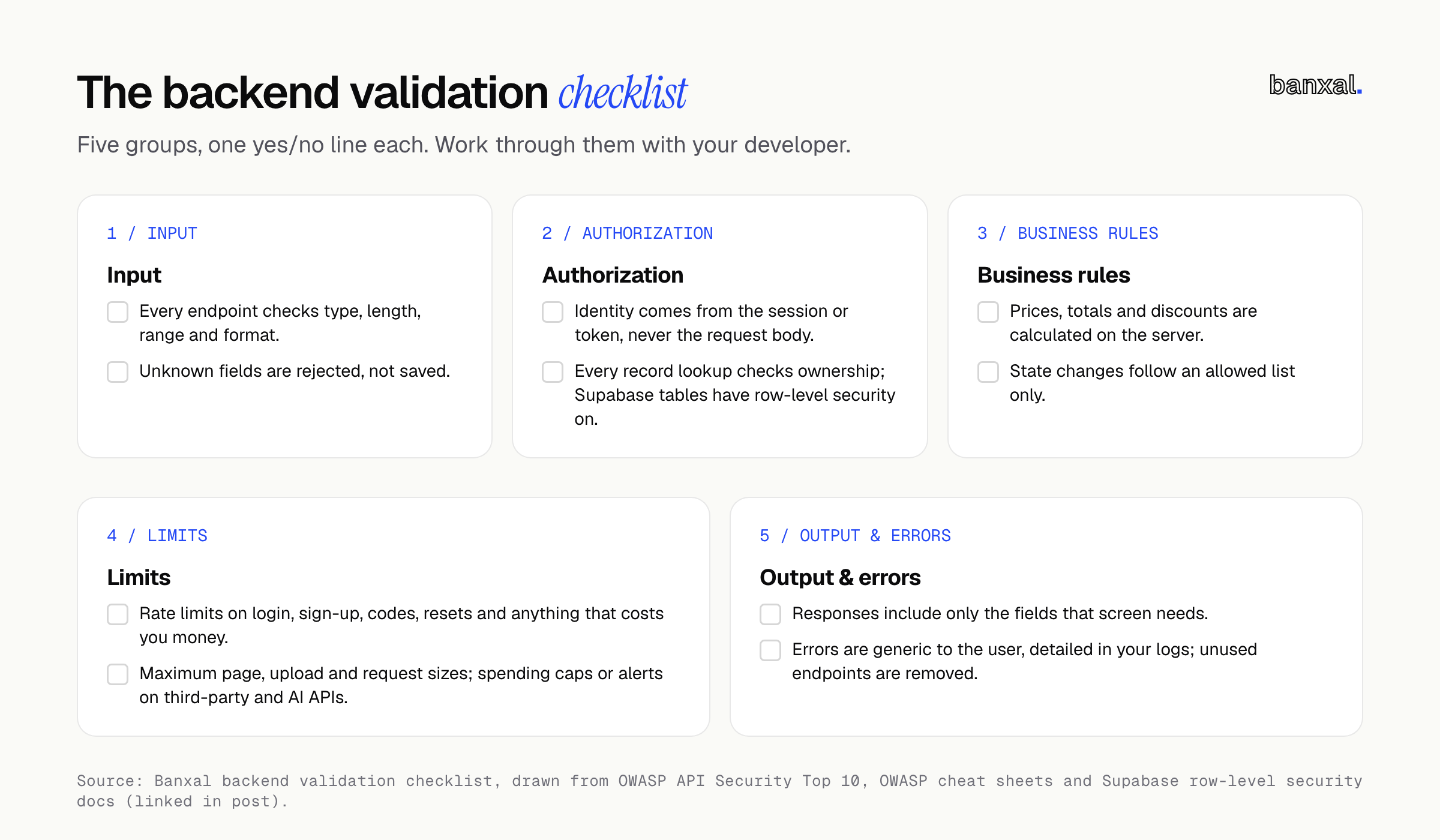
Work through these five groups with your developer — each line is a yes/no check, not a project.
Input
- Every endpoint checks its request against a schema: types, lengths, ranges, formats.
- Unknown fields are rejected, not silently ignored or saved.
- Choices (country, plan, status) are checked against an allowlist.
Authorization
- The user’s identity comes from the session or token, never from the request body.
- Every record lookup checks ownership or permission.
- Admin and staff actions check the role on the server every time.
- If your frontend talks directly to the database (common in Supabase apps), row-level security is on for every table — Supabase: “A table in an exposed schema without RLS is readable and writable by any role with a grant on it” (Supabase).
Business rules
- Prices, totals, discounts and credits are calculated on the server.
- State changes follow an allowed list.
- One-time things (codes, trials, referrals) are enforced as one-time in the database.
Limits
- Rate limits on login, sign-up, codes, resets and anything that costs you money.
- Maximum page sizes, upload sizes and request sizes.
- Spending caps or alerts on third-party and AI APIs.
Output and errors
- Responses include only the fields that screen needs.
- Errors are generic to the user and detailed in your logs.
- Unused endpoints are removed, not just hidden from the UI.
Here’s the shape of it in code. This is a TypeScript example using the Zod validation library; every framework has an equivalent:
// Only these fields are accepted. Anything else (role, plan, isAdmin) is rejected.
const UpdateProfile = z.object({
  displayName: z.string().trim().min(1).max(80),
  timezone: z.enum(ALLOWED_TIMEZONES),
}).strict();

app.patch("/api/profile", requireUser, async (req, res) => {
  const parsed = UpdateProfile.safeParse(req.body);
  if (!parsed.success) return res.status(400).json({ error: "Invalid input" });

  // Who is being updated comes from the session, never from the request.
  await db.user.update({ where: { id: req.user.id }, data: parsed.data });
  res.status(204).end();
});
Keep your client-side checks — OWASP’s position is that client-side validation “is bypassable; use it for immediate feedback” (OWASP Input Validation). It’s for user experience, not security.
A 15-minute self-check for founders
You don’t need to be technical for this. Only test your own app, using accounts you own.
- The two-account test. Log in as user A, copy the URL of one of A’s records (order, invoice or project). In a private window, log in as user B and paste it — you should get “not found” or “forbidden”, never A’s data.
- Look at one response. In Chrome, open DevTools → Network, reload your profile page, and read the API response. Is there anything the screen doesn’t show — other people’s emails, internal flags, password fields?
- Ask your developer five questions:
- “Where is the price calculated — browser or server?”
- “If a request included
role: admin, what would happen?” - “What stops 10,000 calls to sign-up, password reset or our AI feature?”
- “Do we have a list of every live endpoint, with old ones removed?”
- “If we use Supabase or Firebase, is row-level security on for every table?”
Confident, specific answers are a good sign; “the frontend handles that” means you have work to do. Built with Lovable, Bolt or similar? Our fix-or-rebuild self-test sizes the work, and our handoff guide covers rotating secrets before a developer starts. Hiring someone to fix it? These vetting questions show who actually understands this — and if you’re adding a chatbot, the data-readiness checklist keeps private data out of its reach.
Want a second pair of eyes on your backend?
Banxal’s product maintenance & growth work covers ongoing improvements to products we or others built — including apps whose rules live only in the frontend. Planning something new? Our web applications & SaaS builds include auth, payments and admin from day one. Tell us what your app does and how it’s built and we’ll tell you plainly where we’d look first.
FAQ
Is client-side validation useless, then?
No — but client-side validation is not enough on its own. It gives users instant feedback and saves pointless round trips; it just isn’t security, since anyone who sends requests directly can skip it. Do both, and treat the server as the one that counts.
What’s the difference between backend validation and authorization?
Validation asks “is this request well-formed and sensible?” Authorization asks “is this user allowed to do this to this record?” Most serious API problems in the OWASP Top 10 are authorization failures — a request can pass validation and still be dangerous.
Do I need a penetration test?
Work through the checklist first — paying a tester to find a missing ownership check you could catch yourself with two accounts in five minutes is expensive. Once the basics are in place, a professional test is worth it, especially if you handle payments, health data or other sensitive personal data.
Can I use AI to find these gaps before someone else does?
Yes — that’s the other half of the story. DARPA says all seven AIxCC finalist systems “will be made available as open-source software” (DARPA), and AI code review can flag missing checks. Treat what it finds as leads to verify, not a clean bill of health.
Which rule in your app do you suspect lives only in the frontend: a price, a role, a limit? Tell us in the comments.